

README
cinnamon-weather
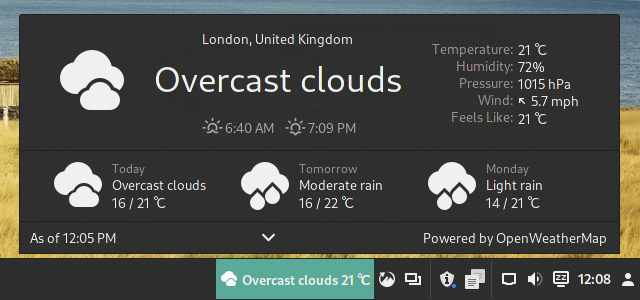
Adaptation of Gnome Shell's weather extension for the Cinnamon desktop.
cinnamon-weather uses Semantic Versioning. For the current version number, see metadata.json.
Versions
Versions are automatically selected based on you Cinnamon's version.
- Cinnamon 3.0+ is End-of-Life, won't receive more updates
- Cinnamon 3.8+ is the currently supported version.
Configuration
Right-click to access cinnamon-settings -> Applets -> Configure.
Location
The applet obtains the location automatically. If the automatic location not adequate for you, you can use the Manual Location mode where the applet either accepts:
- Coordinates in Latitude, Longitude format (e.g. 37.77,122.41). You can use OpenWeatherMap's finder and paste the coordinates in from there.
- or an Address (it can be just a city and country, it is pretty flexible). After 3 seconds, the applet will replace the text that you entered with the full address it finds so you can verify if it's correct. You can also get your exact address to enter from OpenStreetMap's Nominatim search, the service the applet uses.
You can also save locations what you entered manually and switch between them in the applet (arrows will appear on both sides of the location in the applet if you have more than two saved).
Weather providers to choose from
| Weather Providers | Needs API key | Maximum Forecast Days | Maximum Forecast Hours | Immediate Forecast | Alerts | Other information |
|---|---|---|---|---|---|---|
| Open-Meteo | No | 16 | 24 | No | No | Default provider |
| OpenWeatherMap | No | 7 | 0 | No | No | -- |
| MET Norway | No | 10 | 48 | Depends | Depends | -- |
| DMI Denmark | No | 10 | 48 | No | No | -- |
| Deutscher Wetterdienst | No | 10 | 240 | No | Yes | -- |
| Met Office UK | Yes | 6 | 48 | No | No | -- |
| US National Weather | No | 7 | 156 | No | Yes | -- |
| OpenWeatherMap OneCall | Yes | 8 | 48 | Yes | Alerts | -- |
| Pirate Weather | Yes | 7 | 168 | Yes | Depends | -- |
| Visual Crossing | Yes | 15 | 336 | No | Yes | -- |
| WeatherBit | Yes | 16 | 0** | No | Yes* | -- |
| Tomorrow.io | Yes | 15 | 108 | No | Depends | Previously known as Climacell |
| AccuWeather | Yes | 5*** | 12 | No | No* | Limited free calls |
| Weather Underground | Yes | 5 | 0 | No | No | -- |
Open-Meteo
Open-Meteo is an open-source weather API since 2022 that offers free access for non-commercial use. This applets default weather provider from 2024. No API key required. Read more about the service here.
OpenWeatherMap
Worldwide Online Weather service by OpenWeather Ltd founded in 2012 with headquarters in London UK. OpenWeatherMap Website. Read more about the service here.
- This used to be the default provider until May 2024. Big Thanks to them supporting free open source projects, like this!
MET Norway
Free meteorological data and forecasts from the Norwegian Meteorological Institute founded in 1866. MET Norway Website. Read more about the institute here.
-
Nowcast (Immediate precipitation and granular observations) is not available outside Norway. In that case, observations are shown for the next hour.
-
Daily forecasts are generated from 6 hour forecasts (for every hour), so there is a possibility that they are inaccurate sometimes.
- Alerts are only available in Norway
DMI Denmark
The Danish Meteorological Institute formed in 1872 and makes weather forecasts and observations for Denmark, Greenland, and the Faroe Islands. DMI Denmark Website Read more about the institute here.
- The service is global with open weather data.
Deutscher Wetterdienst
German National Weather Provider. Deutsche Wetterdienst Website. Read more about the institute here.
- Only covers Germany.
Met Office UK
The Meteorological Office, abbreviated as the Met Office, is the UK's national weather service founded in 1854. Met Office UK Website. Read more about the agency here. The Data is obtained via their new DataHub API.
-
You need 2 API keys
-
You only have 360 calls a day free, the applet uses 2 at a time so minimum of 15 minutes refresh time is recommended.
- To get the API keys, register here. Log in, then subscribe to
- Site Specific -> Global Spot Free plan. Note down the key you get (you will not see it again), this is your
forecastKey. - Observations -> Land Observations Free plan. Note down the key you get (you will not see it again), this is your
observationKey.
- Site Specific -> Global Spot Free plan. Note down the key you get (you will not see it again), this is your
US National Weather
The National Weather Service in the USA is a federal government agency formed in 1861. US National Weather Website. Read more about the agency here.
-
Only covers the US
-
Sometimes it takes 10-15 seconds to obtain weather, please be patient when it loads up the first time.
- Observations are quite spotty so it combines multiple observation stations if needed in a 50km area.
Swiss Météo
Weather Forecast service in Switzerland run by Federal Office of Meteorology and Climatology MeteoSwiss since 2000 with history back to 1864. Read more about the agency here.
- Only covers Switzerland
OpenWeatherMap OneCall
Version of OpenWeatherMap that supports more features (as before), but needs an API key. You can register for an API key here. After that change your Call limit from 2000 to 1000 to make sure you are not charged.
- Provides 1000 Free calls a day
Pirate Weather
Direct replacement to DarkSky. Run by one guy, it's also open source. If you like the accuracy of the data or you want to keep the project going, subscribe to a paid plan. 10000 calls free. You can get an API key here.
You can read about the project here.
Alerts are an US only feature as of May 2024.
Visual Crossing
Weather service from Visual Crossing Corporation founded in 2003 with headquarters in USA and Germany. Visual Crossing Website. Read more about the service here.
-
Needs an API key, you can Sign Up here and grab one
- Provides 1000 Free calls a day
Weatherbit.io
Historical and Forecast Weather data service provided by Weatherbit LLC in the USA. Weatherbit.io Website. Read more about the service here.
-
To get an API key, go to Weatherbit.io and create an account. Then go your Dashboard where you should find your secret key already created.
-
At least 1 hour refresh rate is recommended, otherwise you might exceed you daily quota. The Free API subscription is limited to 50 calls per day.
-
**Hourly Weather forecast requires a non-free account
- *Using alerts will increase call usage by 33%.
Tomorrow.io
Meteorological data from American weather technology company with headquarters in Boston since 2016. Changed name from Climacell to Tomorrow.io in March 2021. Tomorrow.io Website. Read more about the company here.
-
Please note that old ClimacellV4 keys are not working anymore. You need to re-register and get a new key.
-
API key can be obtained here. Register and the API key will be shown in the Develpment section. Free plan comes with 1000 free calls per day.
- Alerts are available in the US and Canada. Seems to have repeated alerts.
AccuWeather
Online Service from company AccuWeather Inc, founded in 1962 with headquarters in the US, provides a global weather source. AccuWeather Website. Read more about the company here
-
With the free plan, there are only a very limited number of calls for a day, which will be displayed in the applet menu. Please lower your Update interval setting in Configuration or you may run out of calls and then the service will stop with an error message until the next day.
-
***Number of available hours and days are specified for the free plan, paid plans allow more.
-
API keys can be obtained here. Register, then you must add a new App. When it's created Click on the App and the key will be displayed.
- *Alerts are not provided in the Free or Standard plan as of May 2024 so it's not worth supporting in the applet.
Weather Underground
Weather Underground is a privately owned, web-based weather information company. It provides weather observations and forecasts in a large number of locations around the world. It was founded by Jeff Masters in 1995 with headquarters in Ann Arbor United States. Weather Underground website. Read more about the service here.
- Only allows 1500 calls a day, so 15min refresh cycle is recommended.
- Weather Underground is a global community of people connecting data from environmental sensors like weather stations (250.000) and air quality monitors so they can provide the rich, hyperlocal data you need.
- You need an API key. If you don't have a weather station to share data with WU, you can't have an API key. However, you can add a Raspberry Pi as a device for the weather station choice when registering, even if you don't have one, and it will get you the API key.
- Disclaimer: Observations don't provide weather conditions so the forecast one for the day is used.
Usage of "Override label on panel", "Override location label" and "Override tooltip on panel" setting
The setting allows you to make the applet display basically anything in the form of text in the panel (and other places). In addition, it exposes a number of values for you to use as you like, these will be replaced with actual data values. The full text-to-value mapping can be found below. Left-pad values with up to 3 zeros using {humidity,3.0}. Right-pad values with up to 4 spaces using {t.4} (or {t.4. }). Some values have an overridable default padding.
| Text to enter | Mapped value | Padding | Pad Right | Pad Char |
|---|---|---|---|---|
{t} |
Temperature value | 3 | true | |
{u} |
Temperature unit | |||
{c} |
Short condition text | |||
{c_long} |
Long condition text (same as short if not available) | |||
{dew_point} |
Dew point value | |||
{humidity} |
Humidity value (always as percent) | 2 | true | |
{pressure} |
Pressure value | 6 | true | |
{pressure_unit} |
Pressure unit | |||
{extra_value} |
API specific value (usually "Feels Like" or "Cloudiness") | 3 | true | |
{extra_name} |
API specific value's name | |||
{city} |
City name shown in the popup | |||
{country} |
Country name shown in the popup | |||
{search_entry} |
Search entry text in manual location (or location store) | |||
{last_updated} |
Formatted last updated time | |||
{br} |
Line Break | |||
{wind_speed} |
Wind speed | |||
{wind_unit} |
Wind speed unit | |||
{wind_dir} |
Wind direction in text format (NW, etc) | |||
{wind_arrow} |
Wind direction as text arrow (↘, etc) | |||
{wind_deg} |
Wind direction as degree value | |||
{sunrise} |
Sunrise time | |||
{sunset} |
Sunset time | |||
{day_length} |
Daylight length in hours and minutes | |||
{day_remain} |
Daylight remaining in hours and minutes ("" after dark) | |||
{day_rem_pct} |
Daylight remaining as percentage ("0" after dark) | |||
{day_len_rem} |
Day length and daylight remaining (or day length) | |||
{min} |
Minimum temperature | |||
{max} |
Maximum temperature | |||
{tmr_min} |
Tomorrow's min temperature | |||
{tmr_max} |
Tomorrow's max temperature | |||
{tmr_min_diff} |
Tomorrow's min temperature difference from today | |||
{tmr_max_diff} |
Tomorrow's max temperature difference from today | |||
{tmr_t} |
Tomorrow's min and max temperatures | |||
{tmr_td} |
Tomorrow's min and max temperatures with differences | |||
{tmr_c} |
Tomorrow's short condition text | |||
{t_h} |
Temperature in next 1-2 hours | |||
{t_h_diff} |
Temperature change in next 1-2 hours with arrow indicator | |||
{br} |
Line Break | |||
{uv} |
UV index | |||
{uv_text} |
UV index as text (Low, Moderate etc) |
1-Line Examples
- Current Temp, Condition:
{t}{u}, {c} - Daylight & Extremes:
{day_len_rem} ({day_rem_pct}%), Min: {min}{u}, Max: {max}{u} - Full Current Weather:
{t}{u}{t_h_diff}, {c_long}, {humidity}%, {wind_speed}{wind_unit} {wind_dir} ({wind_deg}°), {pressure}{pressure_unit} - Location & Weather:
{city} {country}: {t}{u}, {c}, Wind: {wind_speed}{wind_unit} - Pressure, Humidity, & Wind:
{pressure}{pressure_unit}, {humidity}%, {wind_speed}{wind_unit} {wind_dir} - Tomorrow's Full Forecast:
Tomorrow: {tmr_min}{u} - {tmr_max}{u}, {tmr_c}
2-Line Examples
- Comprehensive Weather & Daylight:
{c} {t}{t_h_diff}{br}{wind_speed}{wind_arrow} {humidity}% {pressure} {day_remain} - Feels Like with Full Wind Info:
{t}{u}{t_h_diff} Feels: {extra_value}{u}{br}Wind: {wind_speed}{wind_unit}, {wind_dir} ({wind_deg}°) - Full Daylight & Timing:
{sunrise} - {sunset}{br}{day_len_rem} ({day_rem_pct}%) - Location, Weather, & Wind Details:
{city}, {country}: {t}{u}{t_h_diff}{br}{c}, {wind_speed}{wind_unit} {wind_dir}, {humidity}% - Today and Tomorrow:
{min} / {max} {u} {c} {t}{u}{br}{tmr_t} {tmr_c}
Automation
Run script when the weather data changes
"Run a script when the weather info changes" field will run the command you provide every time the weather data is updated. The command will be interpolated with the same values with the same format you can get in any of the overrides, in addition you get {full_data} which is the full current weather data. Interpolation with single brackets {xxx} will not be escaped, with double brackets {{xxxx}} they are wrapped in single quotes ' and all other single quotes are escaped inside. Padding and padding defaults can be included with triple brackets {{{xxx}}}. You can use this to integrate the weather data with other parts of your system.
Examples
-
notify-send "The weather is {c} and the temperature is {t}{u}\"will show a notification with the current weather condition and temperature. echo {{full_data}} > /tmp/weather_datawill save the full weather data to a file in/tmp.
Weather data structure you receive
Future Plans
-
Store more forecast variables such as Humidity and Pressure, and add more tags for changes in values
-
Add support for minutely forecasts.
-
Add ability to specify number of decimal places in values, e.g.,
{t_h_diff,4. .1}for 1 decimal place, left-padded with spaces to width of 4. (This might be achievable by extracting float values then applying a default or specified precision to all numerical values.) -
Make tags that (or a way to) default to '' when no upcoming forecast changes in value to save panel space.
-
Add options to use different Unicode arrows for wind direction and change in temp indicators.
-
Ability to set provider per observation, daily/hourly/minutely forecast, alerts independently.
- Add chosen provider(s) to a saved location so when you switch to it it switches providers.
Known Issues
-
Hourly forecast toggle button is not centered to the middle of the popup menu
-
Sunset/Sunrise is not displayed correctly if there is a mismatch between the Location Timezone and System Timezone when using Manual Location with some of the weather providers
-
On subsequent refreshes/relogins the popup menu's element's may lose all padding.
-
If the popup menu is open while refreshing the current weather value row (Temp, Pressure, etc) might shrink so it can't display the values. Workaround: Manual refresh while the popup menu is closed.
- New Breeze icons don't display properly. If you are using them or any icon theme that inherits from them they (mostly) will appear as white boxes. See Symbolic icon rendering issues in Arch linux Cinnamon (#20) · Issues · Frameworks / Breeze Icons · GitLab
Report a new issue
You need a Github login to make a issue report. Please first check if the issue already is reported here. You will find more information about reporting in the Configuration under the Help Tab, accessible by right clicking on the applet. Here you can save logs to file with debug level that is much appreciated. By using the Submit an Issue Button under this Tab, useful system information will be generated for your report form in your default web browser at Github.com.
Troubleshooting
Enabling debug mode
You can enable debug mode for more logging by creating a file named DEBUG in the folder of the applet here: ~/.local/share/cinnamon/applets/weather@mockturtl/, then restart Cinnamon.
See the logs producing by applets
You can see Logs by opening the Cinnamon 'Looking Glass' debugger. You can open it by Right Clicking on your Panel (taskbar), then Troubleshoot->Looking Glass
Logs can be found under the Log Tab.
Developer instructions
Instructions if you want to contribute/work on the applet.
Language Translations
If you want to update or change the translation in your language other than English, here are some steps to get you started. Keep in mind that your local changes will be overwritten when an update of the applets language is installed. Feel free to share your translation, which is very much appreciated, by making a PR (pull request) on Github or contact the current maintainer of the applet.
-
Install the translation editor poedit with your package manager and download your language PO file e. g. xx.po where xx is your ISO language code, and the template POT file weather@mockturtl.pot from the files/weather@mockturtl/po/ sub directory on the Github website
-
Start poedit and open your downloaded PO file xx.po, then go to menu Catalogue or Translate depending on version, choose "Update from POT file…" and open the POT file weather@mockturtl.pot. Start your editing and try to use previously contributed translations as much as possible and get familiar with the correct technical weather terms for things in your language.
- When done translating, click on Validate and Save. This creates a new MO file that you can use locally in your system by overwriting the file ~/.local/share/locale/xx/LC_MESSAGES/weather@mockturtl.mo and restart your system to check how your translation works.
Build Guide
Requires Node 16+ and npm to build.
cd {repo}/weather@mockturtl
npm ci
Build for 3.8
To build and watch for changes
# In applet directory
npm run watch
To Test
# In applet directory
# Will copy the built files into the correct folder and restart the applet - only the applet!
./test.sh
Build for 3.0
3.0 was deprecated in April 2021, but the src is kept for that version. can build it with ./src/3_0/build3_0.sh.
Note: You won't be able to build it anymore unless you fix all type errors - the library declarations need strict and exactOptionalPropertyTypes enabled.
Development flow
- Make sure you have an up-to-date fork of cinnamon-spices-applets on Github. Work on your fork, start on
master. - Open the folder, in VS Code is
code {your_path}/cinnamon-spices-applets/weather@mockturtl- replace{your_path}with the path you cloned the repository to. - Install dependencies
npm ci- you only do this once and every time when thepackage-lock.jsonchanges. - Start the build -
npm run watch. It will rebuild on every change. - Do your work, the relevant files are in
src/3_8- actual codefiles/weather@mockturtl/metadata.json- if you want to update the versionfiles/weather@mockturtl/3.8/settings-schema.json- settings schema you see when you clickConfigure...files/weather@mockturtl/po/- translations. I recommend POEdit to edit themfiles/weather@mockturtl/{icons/arrow-icons}/- custom svg icons
- Test your changes with
./test.sh -
Once you are done
-
Regenerate translation template if you changed any code.
# This needs to be ran from the repo root. cd .. && ./cinnamon-spices-makepot weather@mockturtl && cd weather@mockturtl - Don't forget to increment applet version in
metadata.json - Run
npx eslint ./src/3_8/and fix all errors -
(Optional): Test your changes in the current oldest version of Linux Mint VM. Ideally you would test it in Linux Mint 19 if you can get a hold of it.
- Open your PR in cinnamon-spices-applets
-
Log In To Comment!
440 Comments