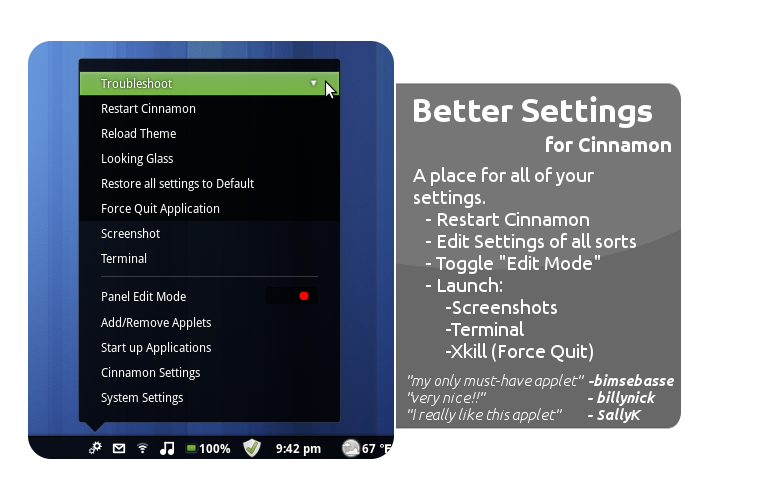
Better Settings 1.1.1
UUID: bettersettings@bownzScore: 61
Download

==================Simply a better settings====================
To Install
1) Extract to ~/.local/share/cinnamon/applets
2) Enable the applet in cinnamon settings.
Changelog===================
1.1.1 - Added notifications to a few tasks, to help.
1.1.0 - Fixed the xkill command, by launching it via .py file.
1.0.3 - Edited icon to fit a "Better"-series applet icon.
1.0.2 - Added "Startup Applications" to the menu, under a request.
1.0.1 - Added "Force Kill Application" under Troubleshoot, which executes the terminal command "xkill".
1.0.0 - Initial release, No problems to my knowledge.

very nice! i didnt like the ^ icon of the other one
Main point I made this XD But I added a few more features, Removed the panel settings, seeing as it's easy to get to from Cinnamon Settings.
agreed. the only thing i dont really like is to have to click on 'troubleshooting' to get to the stuff under there. also i hope like the original that there is a confirmation dialog when i click 'reset all settings to default' - im scared of trying :)
It should. I'll try.
there is :p
I am not getting the choice to restart cinnamon when I click on the applet. Other than that, it looks great ;)
Nevermind. I see how it works now. Lol
The restart settings button is spooky. I've accidentally pressed it several times and then I decided to code a confirmation and make a pull request.
@Dalcde, shouldn't reset it, A popup should apear and ask for confirmation.
Nice! Very useful to us (learning :P) theme artist. Also, the Icon is way prettier than the default one. Good work bownz.
still loving this but could i suggest adding 'startup applications' (gnome-session-properties) as it doesent seem to appear in 'system settings' or in 'cinnamon settings'
Done.
wohoo, thanks :D
Well done applet. One thing though. I've found that "Force Quit Application" either works once and not again or not at all. Sometimes logging out and back in again allows you to Force Quit via your settings menu once but not a second time. Not too sure why this is but the separate "Force Quit" applet works every time. Just letting you know.
I have no clue^^ It uses the same method. Makes no sense to me..
@bownz Regarding the "force quit" issue, I suggest that you try Util.spawnCommandLine instead of Main.Util.spawnCommandLine. I'm not sure if it works (not on a linux machine atm), though.
I really like this applet - a much better choice of icon and commands than the standard cinnamon one.
@dalcde I've tried both.
Nice app, thanks. I added a "Default Applications" menu item which opens gedit and pulls up mimeapps.list so I can set defaults faster. I was looking for a Python app which can parse mime data into a GUI but couldn't find one. Might be a nice feature since there is no way to set Default Apps in Cinnamon yet.
would you want me to make a link to System settings> System Info> defaul Applications?
In the latest Gnome. It is now System Settings > Details > Default Applications. Hard to find. I added a default applications menu item right under your Startup applications to make it easy to get to. gnome-control-center info was the closest command i could find that brings it up. It might be useful for people since it was hard to find the GUI for it.
Nice,really nice applet..Force quit application working fine everytime...Keep the good work, young padawan!!!!!!!!!
alek889, thank you, And I love the "Young Padawan" at the end! I call people that all the time ;p
My only must-install applet, well done bownz
Very good better than the old one but there is one problem - when I try to put it on the bottom panel the actual window that it brings up appears to go downwards, so I can only use it on the top panel :/
Renewable69, I'm confused. Please explain more. Mines on bottom panel.
Nevermind. tested on two panels. Easiest fix atm is after moving press alt+F2 then r then enter. I will work on a fix.
Very nice app. Some kind of "default application" facility (as mentioned above) would be fabulous
Hey. This application is great and very easy to use. I use ubuntu, and the only problem is that does not have the printer menu as in gnome. thank you very much
Have to applet! - keep going!
This is awesome! All of these functions are in one convenient applet. I have a small net-book, so I have had to optimize screen space. The only thing that I would add is a clipboard manager. Think only think that could be taken out is Looking Glass. Again, thanks bonz! I wish that I could have been as talened as you at your age. There would have not been any computers to work with though!
Love it! Thanks a lot!