Would it be possible to change the font to a monospaced one? When temp numbers changes, say from 61 to 62, the icon on the panel to the left of the indicator shift, very slightly, but noticeable to me.
Or maybe fixing to a larger width the box containing the digits.
Sorry, I have no clue on how to change it in the code myself, but if you can give me a hint, I can try to do it.
This is a neat thing! I finally got it to work when I figured out that you need to click the + button in the Applet window of System Settings to make it appear on the taskbar. Thank you.
Hi Claudiux,
I am trying to install this on Linux Mint Mate 21.3 (Virginia) kernel 5.15.0-113, but when I navigate to '~/.local/share', I don't have 'mate/applets' in there. I tried to manually create the folders and drop "temperature@fevimu" in the newly created "applets" folder, then restart mate, but I don't have the applet icon on the taskbar. It works fine on my Linux Mint Cinnamon 21.3 box though. Is there a workaround?
Thanks in advance.
Maybe you figured it out, writing to the benefit of others. I just did by looking at the code. It reads values from sensors I understood. If one wants to set thresholds once for all, edit applet.js, search for DEBUG variable, in comments it is explained how to activate this mode and in the code `if (DEBUG === true) {critical = 53; high = 49;}` - set yours. If one wants configurable in GUI, then one can accurately change json file and js to use new configs. Strangely for me GUI is read by `this.settings.bindProperty(Settings.BindingDirection.IN, 'label-prefix', 'labelPrefix', () => this.on_settings_changed(), null);` and later used via this.state.labelPrefix (settings becomes state on its own...).
P.S. Seems to way to edit/delete a comment once submitted.... what a surprise!
Edit to 1st sentence: "Probably you figured it out already, I'm writing for the benefit of other readers now."
Sorry to hear you're no longer maintaining this Applet.. It still works the best for me, of any temp display I've tried. ;) Hopefully it'll keep working this well.
I love how simple/compact this one is. There's a lot to be said for a simple applet that focuses on just a single function. Sometimes that's exactly what's needed to fit into someone's unique layout.
Anyway, thanks for the work you've done on this!
Hello,
I just created a new applet: Sensors@claudiux https://cinnamon-spices.linuxmint.com/applets/view/337
It can also display the temperature of the processor ... and the speed of the fans... and the voltages... and the status of intrusion detectors.
I have been the maintainer of temperature@fevimu for almost a year and will not continue.
Thank you for welcoming Sensors@claudiux!
Regards.
Claudiux
I feel like kernel v5.3, which is now officially supported by Linux Mint 19, introduces a regression and as a result your applet can no longer read the temperature of the processor.
After answering YES to those questions, sudo sensors-detect outputs
"Sorry, no sensors were detected.
This is relatively common on laptops, where thermal management is
handled by ACPI rather than the OS."
Initially, I decided to upgrade from 4.15 to 5.3 because it's now officially supported, so I was hoping this issue, which has been a thing since as far as I can remember, was gone. Unfortunately that isn't the case so if I want to keep using your applet, I have to stay on 4.15.
Hello i ' m wondering if this is good to use with intel 10th generation .
when i use this applet , the temp is around 60 °C , when i use the command " inxi -Fxz " the temp is :
Sensors:
System Temperatures: cpu: 41.0 C mobo: N/A gpu: nvidia temp: 49 C
Fan Speeds (RPM): N/A gpu: nvidia fan: 46%
why there is about 20 ° C of amount between two systems ?
Please open two terminals.
Into the first one, type: watch inxi -s
Into the second one, type: watch sensors
Compare the values.
inxi shows CPUTIN value, while this applet shows CoreTemp value.
CPUTIN = CPU Temperature Index
AUXTIN = Auxiliary Temperature Index
SYSTIN = System Temperature Index
CPUTIN is different from CoreTemp. CoreTemp is the sensor on the processor while CPUTIN is motherboard CPU temp sensor.
AUXTIN is the power supply temp sensor (if there is one) while SYSTIN relates to Motherboard.
When the CPU temp in °F is moving around 99°-100°, it shifts the panel bar. Can you please space pad it or something to prevent that shift? I've had to disable it because it was too distracting. Thank you.
Hello, I'm sorry for taking so long to provide a feedback.
Regarding your suggestion, it kinda worked. Your applet now gets the correct readings, but it just won't show it IN DEGREES CELSIUS. It will display the current temperature in Fahrenheit, but after changing that to Celsius, with integer values disabled, it reports 0.0ºC. Having it enabled outputs 0ºC.
But if you click once on your applet, it becomes evident it is reading the correct temps.
Please have a look: https://ibb.co/TTxs8VS
I guess this applet could use a hotfix to address the 0ºC issue.
Could you please have a look at it?
TIA.
Actually, no. For temp in both Celsius and Fahrenheit, it displays 0ºC and 32ºF, respectively. Weird. No idea why it just won't display the readings it gets, which are correct. Something is forcing the temp counter to be 0 before doing that. I went through the Spices Update just once because I really don't want to mess with it. Is there anything else I can provide you to better understand this issue?
This applet works just fine on Linux Mint 19.1 Tessa and kernel v4.15.0-106, but after I upgraded the kernel to v5.4.0-37 it only shows 0ºC for my processor.
Here are different ways to try to solve this issue:
- execute the command `sensors` then reboot the computer.
- note the contents of the `/etc/modules` file, if it exists; execute the command `sudo sensors-detect`; for each question, select the default answer, except for the last question 'Do you want to add these lines automatically to /etc/modules?' (YES, if the detected modules are not in the `/etc/modules` file); reboot your computer.
- re-install this applet, using the SpicesUpdate applet (in its menu: Configure -> Applets tab -> check both boxes for temperature@fevimu -> Refresh button).
It works flawlessly on my Linux Mint 19.3. Thank you.
Is there a way to use custom "High Temp" and "Crit. Temp" values. Now both are fixed to 100°C and I can't modify them.
Does not start on Cinnamon 4.6 (Cinnamon says it is not compatible). I updated ~/.local/share/cinnamon/applets/temperature@fevimu/metadata.json to include "4.6" and it seems to work.
Great applet! I've been running it ever since it first came out.
Right now I'm running Mint 19.3 Cinnamon (4.4.8) with kernel 5.3.0-46-generic. If I click on the applet in the panel it reports from my single sensor correctly, but the number that displays directly on the panel always stays at freezing (0C or 32F).
It's been some time since this started, and has self-resolved at least once. But it's been doing this consistently for several weeks now. Any tips?
Does not run under Mint 18.3 Cinnamon :-(
After a new installation I couldn't get it to work anymore.
Message: incompatible with the current version of Cinnamon
hello there,
as Robbie said previously that'd be nice to get the option to add "CPU" or custom values to write what we want as a prefix.
thanks for yer time. works perfect on LMDE Debbie
Linux Mint 19.3 Fanless NUC: Just the job to keep an eye on CPU temperature. Would like the option to prefix the temp display eg: "CPU temp 39.4 C" Otherwise an AbFab applet.
Nice applet. It works for me but only partially.
Using Linux Mint 19.3 in French. When I set the applet to Farenheit it works perfectly but in Celcius, I only see the temperature in the window when I click on it, the icon always shows 0.0.
Thanks for a useful applet and for fixing the problem with Cinnamon 4.4 on Arch.
No more warnings and the applet loads normally.
I have a 4-core AMD Phenom CPU and would like to ask about the displayed temperatures shown as follows:
temp1: 70.5
temp1: 43.0
temp2: 40.0
temp3: 82.0
Why does it not show the first temperature as temp0?
Regarding my first list of temperatures, after checking further, I think the first temp1 70.5°C is from the GPU. The second temp1 is probably the CPU and temp2 is from the motherboard. Perhaps temp3 is from the power supply, or also from the GPU.
OK so the update I got before the one that's available today did a great job!
I no longer saw that annoying message from Mint saying CPU Temperature Indicator could not be initialized.
Now, I'm kinda on the fence as to whether I should download the one available today or not.
I just don't want to break what's working. So for now I guess I will be turn a blind eye on further updates for this applet unless A) the applet breaks once again and that message comes up or B) @jaszhix says it's OK to do so.
You can test the latest version after saving your current version. To do that:
- Open with nemo the folder '~/.local/share/cinnamon/applets'.
- Copy the 'temperature@fevimu' sub-folder into another place (as your Desktop).
- Update this applet using the Spices Update Applet, to make sure you get the latest version.
- Test the latest version. If it does not the job, replace the 'temperature@fevimu' sub-folder by the previously saved one, then restart Cinnamon (and open an issue on Github, please).
Regards.
Sorry for double-posting (apparently I can't edit my previous comment), but after scrolling down the comments, I noticed the mention of lm-sensors, which I do have installed already on my Linux Mint 19.1 Cinnamon "Tara" 64-bit. But in the end, after booting, all CPU Temperature Indicator will do is trigger the error message I mentioned in my previous post.
My laptop is an AMD-based Acer Aspire 5. Is anyone else struggling to find the reason and having cpu temp show an error message via notification popup?
Been keeping this applet up-to-date but still getting the error message where Cinnamon tells me it could not be loaded. Out of 10 times I turn on my laptop, the applet manages to run flawlessly for, like, 3 or 4 times, give or take, after my laptop has booted up: https://imgur.com/a/nco9d5R
Anyone else running into the same issue?
Why it does not work? It works very well for me.
What are the High and Critical temperatures of your sensors?
Please run the command 'sensors' in a terminal.
One of the returned lines must be like:
Package id 0: +58.0°C (high = +69.0°C, crit = +75.0°C)
So, when the temperature (actually +58.0°C) becomes greater than +69.0°C, the applet becomes orange. (Red for temp greater than +75.0°C.)
Unwanted behaviour: after reaching 80°, the taskbar (and all window indicators) starts dancing like crazy because of the ‘High’ text appearing and disappearing after every refresh during the fluctuation. It would be awfully nice to add *just two settings*: show ‘High’ if high and show ‘Crit’ if critical. A different (slightly more complicated) approach to consider would be adding ‘High’ or ‘Crit’ in yellow and red below or above the indicator (if such an option is enabled) because it would make the applet width fixed, which is the expected behaviour from applets. Thank you in advance for considering this easy addition.
i had same issue. was working in mint 19.1. after upgrading to 19.2, stopped working. also i kept getting authentication request for a flatpak on startup. so i decided to uninstall --purge flatpak. rebooted and everything is working fine. i had to remove and reistall the cpu temp applet.
note, had read removing flatpak causes lots of problems for mintinstall, etc. i haven't had any such issues yet.
this applet cause following message for a long span of time in my .xession-errors, spamming it to grow endlessly , Please fix this bug your applet is great.
Cinnamon warning: Log level 128: posix_spawn avoided (fd close requested)
I have two systems (different motherboards) but both loaded recently with Mint 19 and all upgrades applied to both. Same software complement mostly. The cpu temp works flawlessly on my AMD 6300 but balks and displays 32F on the AMD 4100. I assume the kernel has to load some sensors... perhaps that is the difference. No big deal except trying to optimize case cooling for the system that's on 24/7. Anyone?
Dave
After updating to Cinammon 4.0.0 (on Arch Linux), the CPU temperature applet wont run. Log message:
[temperature@fevimu]: Extension is not compatible with current Cinnamon version
Latest Mint; Kernal 15.0-22; NCT6755 controller; Ryzen 1700;
Drop down is populated with correct values, but the one held inside the bar itself remains "NaN".
If NCT6775 isn't loaded, the dropdown still contains Temp1, and Temp2 and the bar still has "NaN".
This seems to have caused an issue with cinnamon for me (Mint 17.2 Rafaela), after installing via the applets widget, my desktop was frozen other than mouse functionality. Now it boots into a black screen with just a mouse pointer, nothing else works. Booting into advanced options and using startx in the terminal gets me a cinnamon desktop (without my usual settings) in which I can use Terminal but nothing else. I can't see any reference to temperature applet in .local/share/cinnamon/applets - how do I completely remove all traces of this applet and restore my desktop?
You have to log in like normal into cinnamon.
Once you are at the black screen please CRTL+ALT+F2. This will bring you to a console session.
Then login at the command prompt with your regular user.
Then remove the temperature applet files from these locations.
cd ~/.local/share/cinnamon/applets
rm -R temperature@fevimu
cd ~/.cinnamon/configs/
rm -R temperature@fevimu
Then reboot, you should be able to get into cinammon again.
this applet cause that cinnamon process consume a lot of memory (1GB every 24 hours).
The applet manager advertise that this applet uses bads functions.
I remove the applet and cinnamon only uses 160 MB (24 after).
Great applet and have been using it for years but doesn't work with Mint 17.3 since the applet updated today to the new version. Here is the error log, tell me if you need more info to help fix this? Cheers
error t=2018-01-18T09:46:57.549Z Initial settings schema file is not valid for temperature@fevimu
error t=2018-01-18T09:46:57.550Z Problem initializing settings for temperature@fevimu
error t=2018-01-18T09:46:57.550Z this.settings.bind is not a function
trace t=2018-01-18T09:46:57.550Z
<----------------
MyApplet.prototype._init@/home/kevin/.local/share/cinnamon/applets/temperature@fevimu/applet.js:31
MyApplet@/home/kevin/.local/share/cinnamon/applets/temperature@fevimu/applet.js:20
main@/home/kevin/.local/share/cinnamon/applets/temperature@fevimu/applet.js:402
createApplet@/usr/share/cinnamon/js/ui/appletManager.js:329
addAppletToPanels@/usr/share/cinnamon/js/ui/appletManager.js:256
finishExtensionLoad@/usr/share/cinnamon/js/ui/appletManager.js:59
loadExtension@/usr/share/cinnamon/js/ui/extension.js:451
onEnabledAppletsChanged@/usr/share/cinnamon/js/ui/appletManager.js:197
---------------->
error t=2018-01-18T09:46:57.550Z [Applet "temperature@fevimu"]: Failed to evaluate 'main' function on applet: temperature@fevimu/42
error t=2018-01-18T09:46:57.551Z Could not load applet temperature@fevimu
i have been running linux mint cinnamon on a test computer and so far the only thing not working is this applet. any idea when this will be made to work on 18.2 as its a great applet.
Thankyou
After Updating Linux Mint 18.1 to 18.2, the Applet causes little Hick ups, small Freezes every few seconds.
Hardware is a Intel NUC7i3BNK (Kaby Lake). Disabling the Applet and after restarting Cinnemon, everything is running smooth again. With Mint 18.1, there was no problem with this Applet on the same Hardware.
Seconding this - it's happening on my--recv-keys 1C61A2656FB57B7E4DE0F4C1FC918B335044912E Dell Precision 5520 (Kaby Lake). Drove me nuts until I traced it back to this applet, I'd thought it was an issue with the graphics drivers.
I see this comment in the changelog: "remove panelMenu.js, which is unused but for 2 applets. There are a bunch of applets that import it but don't use it, all of which can be fixed now."
To fix this applet, simply remove the line "const PanelMenu = imports.ui.panelMenu;" from ~/.local/share/cinnamon/applets/temperature@fevimu/applet.js
On Mint 18.2 fails to init with:
error t=2017-07-04T18:34:12.910Z No JS module 'panelMenu' found in search path
trace t=2017-07-04T18:34:12.910Z
<----------------
@/home/me/.local/share/cinnamon/applets/temperature@fevimu/applet.js:3:7
Extension.prototype._init@/usr/share/cinnamon/js/ui/extension.js:155:13
Extension@/usr/share/cinnamon/js/ui/extension.js:116:5
loadExtension@/usr/share/cinnamon/js/ui/extension.js:449:25
init@/usr/share/cinnamon/js/ui/appletManager.js:47:9
start@/usr/share/cinnamon/js/ui/main.js:454:5
@<main>:1:31
---------------->
error t=2017-07-04T18:34:12.910Z [Applet "temperature@fevimu"]: Error importing applet.js from temperature@fevimu
error t=2017-07-04T18:34:12.910Z Could not load applet temperature@fevimu
Great stuff! Some feedback:
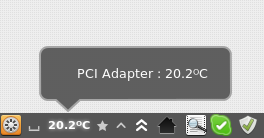
- How about some settings option where one can choose which adaptator to display? The one that appeared by default messed the indicator: I had a virtual device at 12 degrees (lower than the room temperature...) while my core temp was around 40 - 45. The end result was a display of 30 degrees, which doesn't make any sense for me. Commenting the line 267 in applet.js was my solution.
- Also, instead of using "°C" (two character), I replace it with the proper symbol: "℃" (one character) so it displays exactly like the symbol of the weather applet of "weather@mockturtl". Tiny detail indeed but it yields a much better look.


Log In To Comment!
134 Comments