

README
1440 Cinnamon Applet
Introduction
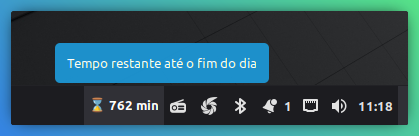
The 1440 applet for Cinnamon is a simple and effective tool designed to help you stay focused on productivity by constantly displaying the minutes remaining until the end of the day. It's ideal for students, professionals with tight deadlines, or anyone looking to optimize their daily routine more efficiently.
Features
- Daily Countdown: Displays in real-time the number of minutes left until the day ends.
- Productivity Focus: Helps visualize the remaining time, encouraging efficient management of your tasks.
- Automatic Update: The counter updates every 60 seconds to ensure accuracy.
- Intuitive Icon: Uses an hourglass icon (⌛️) for a clear visual representation.
Manual Installation on Cinnamon
To manually install the 1440 applet in your Cinnamon environment, follow the steps below:
-
Navigate to the Cinnamon applets directory:
Open the terminal and use the
cdcommand to go to the folder where Cinnamon applets are stored locally:cd ~/.local/share/cinnamon/applets -
Clone the applet repository:
Navigate to the Cinnamon applets directory and clone the repository:
cd ~/.local/share/cinnamon/applets git clone https://github.com/jvlianodorneles/1440.git 1440@jvlianodorneles -
Restart Cinnamon (or the panel):
For Cinnamon to recognize the new applet, you can restart the graphical environment. The easiest way is to press
Alt + F2, typer, and pressEnter. This will restart Cinnamon without closing your applications. -
Add the applet to the panel:
- Right-click on an empty area of your Cinnamon panel.
- Select "Add applets to panel...".
- In the window that opens, go to the "Installed applets" tab.
- Look for "1440" in the list.
- Select it and click "Add to panel."
Now you should see the "1440" applet displaying the remaining minutes of the day on your Cinnamon panel!
Log In To Comment!
0 Comments