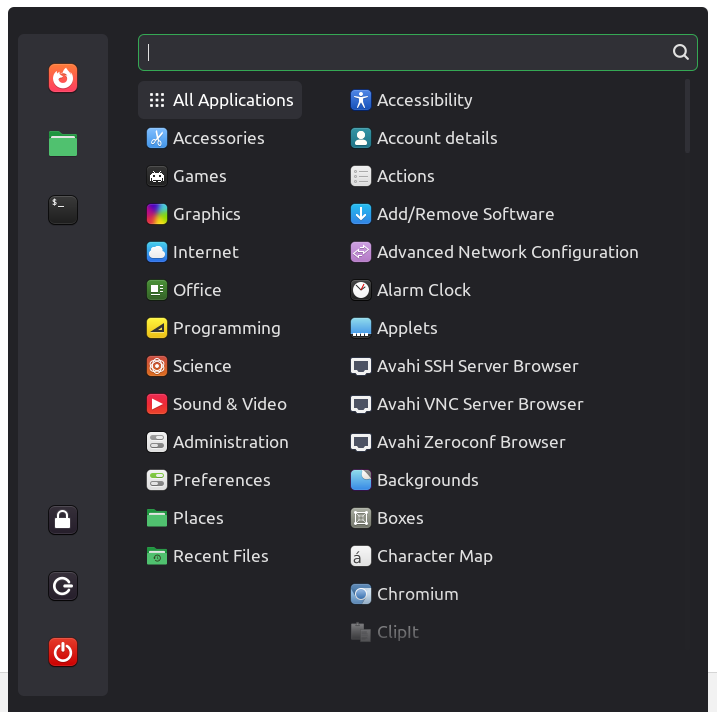
Classic Menu

UUID: classic-menu@fredcw
Last edited:
3 days ago 2026-01-17, 05:25
Last commit: [91b901b1] classic-menu@fredcw: Add tr.po (#8214)

The classic Cinnamon menu for cinnamon 6.6 and later

README

Close

This the the old cinnamon main menu prior to cinnamon 6.6

Installation

The easiest way to install an applet is to right click on the panel you want to add the applet to and select "Applets". Then go to the "Download" tab to download the applet and then add it to the panel on the "Manage" tab.

Log In To Comment!

25 Comments

Paul Birkholtz
Paul Birkholtz-1 day ago
Even if I like the new menu more than the old, I am happy this is being provided. This is what Linux is about!
Jack Christensen
Many thanks for providing this. Much better than the new version IMHO.
Roadfox-Master
Roadfox-Master-3 days ago
Dieses Applet ist eine Wohltat und endlich funktioniert das Blue-Mint Theme unter Linux Mint 22.3 wieder sauber.
Lungenpest
Lungenpest-4 days ago
LMDE7 update to Cinnamon 6.6 destroyed the menu. This applet is a relief. Thank you so much. Where can i donate some money for this menu to @fredcw?
Melroy van den Berg
I agree.. Cinnamon 6.6 destroyed the perfectly fine menu... Maybe they should first beta test this menu first with a selective amount of people, before pushing it this hard
SynapticStatic
SynapticStatic-6 days ago
Keep up the good work, I love this menu :)
Melroy van den Berg
Ow luckily its still there.... I was really the VERTICALLY stacked system buttons.. I wanted to go back to the "classic" menu again. I don't yet like the new menu, its not efficient.
Melroy van den Berg
I really want vertically stacked system buttons*
Psicrow925
Psicrow925-6 days ago
Perfect, thank you :)
bonafinim
bonafinim-1 week ago
Thank you! Like many others, I am not really a fan of the new sidebar. Maybe I’ll get used to it over time, but I appreciate having the option to return to the old layout for now.
ro55mo
ro55mo-1 week ago
Thank you for creating this. The non-removable text on the favourites icons in the start menu was having me thinking about going to native Debian.
Gugamineyt13
Gugamineyt13-1 week ago
I was expecting this applet to be created but not for it to be this quick, thanks pal!
Yixo
Yixo-1 week ago
I have no idea why we can't turn off text on the sidebar in default mint...
Melroy van den Berg
I also do not know why I can not vertically stack the system button in the new default menu.
flabdablet
flabdablet-1 week ago
Oh, you absolute legend. Thank you! Given that this is almost always going to replace the existing menu applet rather than simply being added to the panel, it would be nice to have the README include explicit instructions for how to to that for folks not already familiar with panel editing.
wanderingmagus
wanderingmagus-1 week ago
Thank you so much!
lubepi
lubepi-1 week ago
Thank you!!
Subvert
Subvert-1 week ago
thank you, cblack was broken on the new menu
manucorsu
manucorsu-1 week ago
Thank you for making this. I really hate the new menu so I'm glad that this came out right as 22.3 released.
Snoopy81m
Snoopy81m-1 week ago
Thank-you for sharing this. Maybe I'm old fashioned, but the new layout with 3 columns is a little confusing. My elderly brain is used to rely on colours, so Black & white icons are less efficient. Finally, the 4 or 5 icons on narrow sidebar, are really a plus, as «every day icons» are on TaskBar, and «not everyday, but I want a fast access» on the Start Menu was a real improvement over the [Windows XP] text. I'm aware the new start menu should be an improvement for a lot people, but everyone don't use this feature the same way…
Melroy van den Berg
its not just you ;) I'm 36.. I also want the classic menu
Omerta-png
Omerta-png-1 week ago
Many thanks! The new menu isn’t bad and fits the Nemo style nicely, but it isn’t customizable. As a result, I could no longer read the hovered lines with my ~/.theme. Best regards.
uncledulgaria
uncledulgaria-2 weeks ago
Thank you fredcw. It seems a shame that you have had to do this in order that those of us who felt very, very comfortable with the classic menu could continue to use the same trackpad actions. It is almost possible to get back there, but the new system icons are rather small, and require tighter control to hit. Regards uncledulgaria
fredcw
fredcw-1 week ago
Actually, the size of those buttons in the new menu is set by the theme. Copy your theme to ~/.themes. Look for appmenu-system-button in the cinnamon.css in your theme and change the padding value.
kyphi
kyphi-2 weeks ago
Thank you fredcw. Regards kyphi