

UUID: claude-usage@mtwebster
Last edited:
7 months ago
2026-03-06, 10:56
Last commit: [beed99ca] claude-usage@mtwebster: Make last-api-call-time persistent across restarts to prevent triggering of status 429 (#8408)
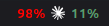
Display Claude API usage limits (5-hour and 7-day)
README
Claude Usage Monitor
A Cinnamon panel applet that displays Claude API usage limits (5-hour and 7-day) by polling the Anthropic API endpoint.
Features
- Displays 5-hour and 7-day usage percentages in the panel
- Color-coded text: green (<50%), yellow (50-80%), red (>80%)
- Displays extra usage token count when enabled.
- Configurable polling interval (1-60 minutes, default 5)
- Tooltip shows reset times and last update time
- Custom credentials path support
Requirements
- Claude Code installed and configured (provides API credentials)
- Alternatively, you can specify a custom path to your Claude credentials file
- Long-lived API keys are not supported (claude setup-token). You can revert to a 'normal' token by deleting your credentials file and logging in using
/login. - Internet access (for calls to
https://api.anthropic.com/api/oauth/usage).
Installation
From Cinnamon Settings (Recommended)
- Open Cinnamon Settings → Applets
- Go to the "Download" tab
- Search for "Claude Usage Monitor"
- Click "Install"
- Enable the applet in the "Manage" tab
Manual Installation
- Download and extract the applet
- Copy the folder
claude-usage@mtwebsterto~/.local/share/cinnamon/applets/ - Enable the applet in Cinnamon Settings → Applets
License
GPL-3.0 License.
Log In To Comment!
4 Comments