

UUID: ma-ram-monitor@lanote
Last edited:
7 months ago
2026-02-26, 08:00
Last commit: [95723105] Hungarian translation update (#8380)
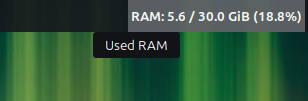
A customizable RAM monitor. Reads memory statistics directly from the kernel's virtual filesystem (/proc/meminfo) for maximum accuracy and low overhead.
README
Moderately Advanced RAM Monitor
A high-performance, customizable RAM monitor for the Cinnamon Desktop Environment. Designed with visual stability and system efficiency in mind.

Key Features
- Kernel-Direct Data: Reads memory statistics directly from
/proc/meminfo. This ensures maximum accuracy and near-zero CPU overhead compared to spawning external processes likefreeortop. - Visual Stability Control: Includes a "Monospace Mode" with customizable string padding. This prevents the panel from "jumping" or shifting when memory values change (e.g., switching from 9.9% to 10.0%).
- Customizable Alerts: Visual blinking warnings when RAM usage exceeds (or available memory falls below) user-defined thresholds.
- Smart Interaction: Left-click to launch your favorite system monitor (GNOME System Monitor, htop, btop, etc.).
- Unit Flexibility: Support for both Binary (GiB) and Decimal (GB) units.
Installation
- Copy the
ma-ram-monitor@lanotefolder to~/.local/share/cinnamon/applets/. - Enable the applet in Cinnamon Settings -> Applets.
- (Optional) Configure the layout and alerts in the applet settings.
Technical Details
The applet utilizes the following Linux kernel metrics:
- MemTotal: Total usable RAM.
- MemAvailable: An estimate of how much memory is available for starting new applications, without swapping.
Translations
- English (Default)
- Polish (Full support)
License
This project is distributed under the same license as the Cinnamon Desktop environment (GPLv2+).
Log In To Comment!
0 Comments