

README
Multi-Row Panel Launchers
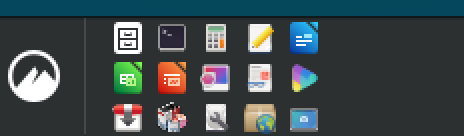
A Cinnamon desktop applet that wraps panel launcher icons into multiple rows, making better use of tall panels.
Forked from the stock panel-launchers@cinnamon.org applet. Uses Clutter.FlowLayout (the same technique as multirow-window-list) to wrap launcher icons into a 2D grid instead of a single row.
Why not the stock panel launchers?
The stock applet lays every launcher out in a single row, so a tall panel (48–60px+) wastes vertical space and a long launcher list eats horizontal space. This applet keeps the stock applet's behavior (same launcher list format, same right-click menus, same "Add to Panel" integration) and adds:
- 2–4 rows of smaller icons in the same panel height — double or triple the launchers in the same width, familiar to anyone coming from a dense Windows-style taskbar
- An overflow popup when you cap the launcher area width — excess launchers stay one click away instead of stretching the panel
It replaces the stock applet (both claim the panellauncher role, so Cinnamon allows only one to be active). With max rows = 1 and no max width, it behaves like the stock applet.
Features
- Multi-row wrapping: Icons wrap into 1–4 rows based on available space
- Auto-sizing: Icons auto-scale to fit the panel height and row count
- Manual override: Optional icon size override (0–64px)
- Max width cap: Limit the launcher area width — excess icons overflow into a popup
- Overflow popup: When max-width is set and there are too many launchers to fit, a chevron button appears. Click it to open a popup grid with the remaining launchers.
- Hover/click feedback: All launcher icons (both in the panel and overflow popup) show visual feedback on hover (border highlight) and click (background tint)
- Drag and drop: Reorder launchers within the 2D grid (panel and overflow popup)
- "Add to Panel": Works with Cinnamon menu's right-click "Add to Panel" feature
- Vertical panel support: Falls back to standard vertical layout
Requirements
- Cinnamon 6.0+ (developed and tested on Cinnamon 6.0.4 / Ubuntu 24.04; Linux Mint 21.3+ equivalent)
Installation
git clone https://github.com/science/cinnamon-multirow-panellauncher.git
cd cinnamon-multirow-panellauncher
./install.sh dev        # live-edit symlink (edits go live on next Cinnamon restart)
# or
./deploy.sh             # rsync repo into <UUID>.stable/ and flip symlink there
                        #   (edits stop affecting the running applet until re-deploy)
install.sh dev validates files, checks your Cinnamon version, creates a symlink pointing at the repo, and warns if the stock panel-launchers applet is still active (both claim the panellauncher role — only one should be enabled at a time). Use deploy.sh instead when you want a frozen snapshot so the running applet is insulated from in-progress edits.
After installing:
- Right-click the panel → Applets
- Search for "Multi-Row Panel Launchers"
- Add it to your panel
- Remove the stock "Panel launchers" applet if present
- Restart Cinnamon:
Alt+F2→r→ Enter
Configuration
Right-click the applet → Configure:
| Setting | Default | Description |
|---|---|---|
| Maximum rows | 2 | Number of rows for launcher icons (1–4) |
| Icon size override | 0 (auto) | Manual icon size in pixels (0 = auto-scale to row height) |
| Max width | 0 (no limit) | Maximum width for launcher area in pixels. When set, excess launchers appear in an overflow popup. |
| Allow dragging | On | Enable drag-and-drop reordering |
| Debug logging | Off | Write layout diagnostics (MRPL: lines) to the log for troubleshooting |
Tips:
- Set max-width to constrain how much panel space the launchers use. A chevron appears when icons overflow, opening a popup grid on click.
- Set max rows = 1 for a single-row layout that matches the stock applet but adds overflow support.
- Icon size override acts as a preferred maximum. It is capped by
floor(panelHeight / rows) - paddingsorowsrows of (icon + padding) always fit within the panel height — otherwise the bottom row gets clipped. On a 48px panel with rows=3, a 16px override caps to 13px; on a 60px+ panel it applies as-is. - Icon size override = 0 (the default) auto-scales icons to
floor(panelHeight / rows) - 4pixels. - The applet's runtime config (launcher list + settings) is stored at
~/.config/cinnamon/spices/multirow-panel-launchers@science/<panel-id>.json. - The applet automatically writes a
panel-launchers-backup.jsonalongside the instance config on every settings change. This backup is instance-ID-independent and can be restored via./restore-config.shafter a panel reset. If you use a dotfiles manager (e.g. yadm), tracking this backup file keeps your launcher configuration consistent across machines.
Uninstallation
./uninstall.shSafe to run from a TTY if Cinnamon has crashed. Removes the applet from the enabled-applets dconf list and deletes the symlink.
Development
Running tests
npm test                            # 208 Node.js tests across 4 files
./test/vm-layout-regression.sh      # 10 behavioral D-Bus assertions (must run on VM/host with Cinnamon)
./test/vm-overflow-test.sh          # overflow popup integration suite (runs over SSH from host)
Node tests cover helper function math, settings schema validation, static safety checks on applet.js (cleanup, signals, metadata, FlowLayout, DND, hover feedback, overflow architecture), and sandboxed install/uninstall integration. The VM layout regression test hits Cinnamon via D-Bus Eval to verify that icon_size, container width, rendered launcher height, and the 3×5 grid shape all match the production config — this is the regression lock for the starvation/cap bug.
Project structure
applet.js              # Main applet (GJS/Clutter/St)
helpers.js             # Pure functions (testable in Node.js)
metadata.json          # UUID, name, role
settings-schema.json   # Cinnamon settings schema
stylesheet.css         # CSS (hover uses inline styles due to important:true)
icon.png               # Applet icon (128x128, square)
install.sh             # Dev-mode install (./install.sh dev symlinks the repo)
deploy.sh              # Promote repo → stable snapshot + flip symlink
uninstall.sh           # Safe uninstall
restore-config.sh      # Restore launcher config after Cinnamon instance-ID change
build-spices.sh        # Build Spices-compatible package for submission
test/
  helpers.test.js              # Unit tests for helper functions (89 tests)
  schema.test.js               # Metadata + settings validation (11 tests)
  applet-lint.test.js          # Static safety checks on applet.js (88 tests)
  install-uninstall.test.js    # Sandboxed integration tests (20 tests)
  vm-layout-regression.sh      # Live D-Bus behavioral test (10 assertions)
  vm-overflow-test.sh          # Overflow popup VM integration (via SSH)
Publishing to Cinnamon Spices
This applet can be submitted to the Cinnamon Spices marketplace, making it installable from Cinnamon's built-in System Settings > Applets > Download tab.
To build a Spices-compatible package:
./build-spices.shThis creates dist/multirow-panel-launchers@science/ with the nested files/UUID/ layout that the Spices monorepo requires. Copy that directory into your fork of linuxmint/cinnamon-spices-applets and open a PR.
Before submitting, you'll need a screenshot.png at the repo root showing the applet on a panel. The build script will include it automatically if present.
License
GPL-2.0-or-later — this applet is a derivative of the stock panel-launchers@cinnamon.org applet (© the Linux Mint team, GPL-2.0+). See LICENSE.
Log In To Comment!
0 Comments