

README
Snippitor (Cinnamon applet)
A panel applet + background daemon that expands short triggers into full
text anywhere on your desktop — type tel# then a space/enter/punctuation
and it becomes 01234567890.
How it's put together (and why)
A Cinnamon applet on its own can only see clicks/keys inside its own panel widget — it has no way to intercept what you type into Firefox, a terminal, LibreOffice, etc. So this is three pieces:
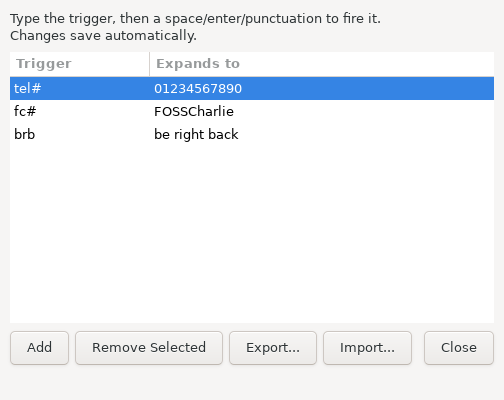
applet.js— the panel icon. Click it to start/stop Snippitor, right-click for "Edit Expansions...".snippitor_daemon.py— a small Python background process usingpynputthat watches your keystrokes system-wide (X11 only) and does the actual find-and-replace.snippitor_gui.py— a GTK window (opened from the applet's menu) where you add/edit/remove trigger → expansion pairs. It saves todata/expansions.jsoninside this applet's own folder, which the daemon polls every ~2 seconds and reloads automatically — no restart needed. Storing data inside the applet folder (rather than~/.config) means removing the applet - by any method, including ones that don't run this applet's own cleanup code - naturally deletes its data too.
Requirements
Snippitor bundles its own copy of pynput, so there's nothing to pip install. The only requirement is GTK3's Python bindings for the editor
GUI — these are virtually always already present on a Cinnamon desktop
(Cinnamon Settings, Nemo, and most Mint tools depend on them too), but if
the "Edit Expansions..." window doesn't open, install them with:
sudo apt install python3-gi gir1.2-gtk-3.0X11 only. If you're on a Wayland session (check with echo $XDG_SESSION_TYPE),
the global keyboard hook won't work — this is a limitation of Wayland's
security model, not something fixable in the script. Cinnamon defaults to X11
on most distros (Linux Mint especially), but it's worth checking.
Install
mkdir -p ~/.local/share/cinnamon/applets
cp -r snippitor@FOSSCharlie ~/.local/share/cinnamon/applets/
Then:
- Restart Cinnamon:
Ctrl+Alt+Esc, or runcinnamon --replace & - Right-click the desktop → Applets (or open Cinnamon Settings → Applets)
- Find "Snippitor" in the list and click + to add it to a panel
No pip installs, no terminal commands beyond the copy above — the whole thing works out of the box once it's in the applets folder.
Use
- Click the panel icon to start Snippitor (icon changes to indicate it's running). Click again to stop it - though it also auto-starts on its own, so this is optional.
- Right-click → Edit Expansions... opens the GUI editor. Add, edit, remove, export, or import rows - everything saves automatically as you go, no Save button needed. Only one editor window can be open at a time.
- Type a trigger (e.g.
tel#) followed by a space, tab, enter, or punctuation character, and it's replaced with the expansion.
A starter expansion (tel# → 01234567890) is included by default, stored at
data/expansions.json inside this applet's own folder.
Known limitations
- X11 only, not Wayland (see above).
- The trigger must be followed by a boundary character to fire — same
behavior as tools like AutoKey or espanso, so it doesn't
mangle words you're still typing (e.g.
tel#inside a longer word won't fire until you hit a space/punctuation after it). - Snippitor doesn't currently auto-start on login — you start it from
the panel icon each session. If you want it running automatically,
the simplest option is to add
python3 ~/.local/share/cinnamon/applets/snippitor@FOSSCharlie/snippitor_daemon.pyto Cinnamon Settings → Startup Applications. - This is a personal-use utility script, not hardened security software —
pynputsees literally everything you type while the daemon runs (that's inherent to how tools like this work, including AutoKey and espanso).
License
Snippitor is free software, licensed under the GNU General Public License v3.0 (or, at your option, any later version). See the LICENSE file for the full text.
Disclaimer
This software is provided "as is", without warranty of any kind, express or implied — see sections 15-16 of the LICENSE for the exact legal terms. You use this applet entirely at your own risk. Given that Snippitor works by watching keystrokes system-wide in order to detect triggers, please read the "Known limitations" section above before installing, and back up anything important before relying on it.
Log In To Comment!
1 Comments