

UUID: modern-sound@husain-anabtawi.com
Last edited:
2 months ago
2026-08-03, 18:09
Last commit: [a00a448b] [modern-sound] v1.2.0 release over-amplification support (#8925)
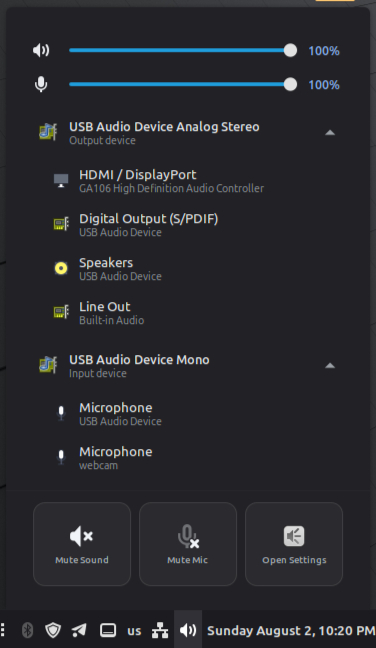
A modern Cinnamon sound applet with volume control
README
Modern Sound
A modern Cinnamon panel sound applet — compact by default, expandable when needed.
Install
- Open Menu → Preferences → Applets
- Go to Download
- Search for Modern Sound and install
- Add it to your panel
Using the applet
Left click — sound menu
- Master volume — slider with percentage
- Mic volume — slider with percentage
- Output device — current speaker/headphone; click the row to expand when multiple devices are available
- Input device — current microphone; click the row to expand when multiple devices are available
- Applications — per-app volume for apps that are playing audio
- Quick actions — Mute Sound · Mute Mic · Open Settings
Scroll wheel — panel icon
Scroll up or down on the sound icon in the panel to raise or lower master volume (5% per step).
Right click — applet options
- Configure… — applet settings (see below)
- Panel Settings… / Remove Applet… — standard Cinnamon panel options
Settings
Right-click the applet → Configure…
Panel
| Setting | Description |
|---|---|
| Open menu | Keyboard shortcut to open the menu (default: Shift+Super+S) |
Devices
| Setting | Description |
|---|---|
| Hide output device when only one is available | Removes the output row from the menu when you have a single output |
| Hide input device when only one is available | Removes the input row from the menu when you have a single microphone |
When a setting is off (default), the device row stays visible even with one device — useful to see which device is active.
Feedback
For bug reports, feature requests, and other feedback, open an issue on the development repository:
github.com/hus201/cinnamon-modern-sound-applet/issues
Changelog
See CHANGELOG.md for release notes.
Log In To Comment!
9 Comments