

README
AirAware
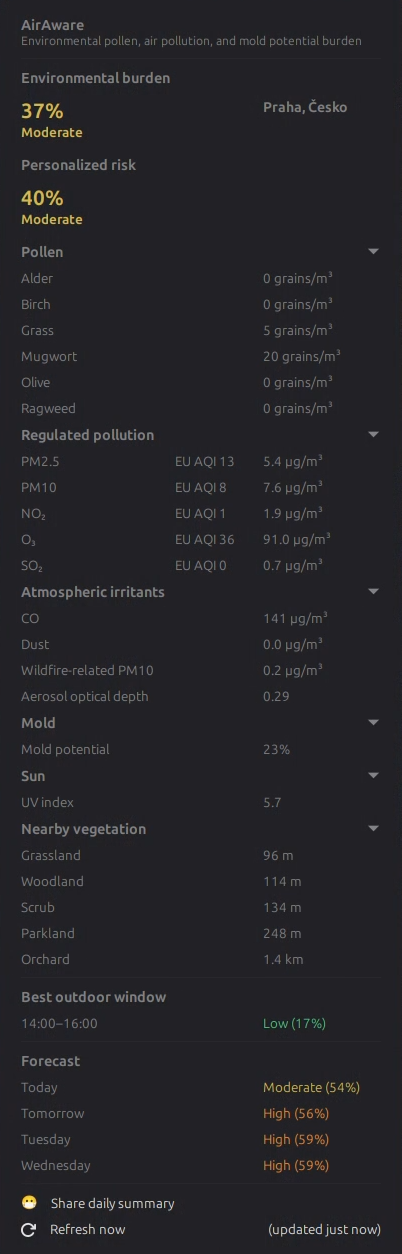
AirAware is a Cinnamon panel applet that shows the current environmental allergy burden from pollen, air pollution, and weather-based mold potential. It displays a compact panel indicator and a native Cinnamon popup with current conditions and a short forecast.
AirAware reports environmental conditions only. It does not predict symptoms, diagnose allergies, or provide medical advice.
Features
- Panel icon with risk-colored line work and an optional label
- Automatic approximate location lookup through GeoClue2
- Manual latitude and longitude fallback when automatic location is unavailable
- OpenStreetMap button in settings to help choose coordinates
- Reverse-geocoded place name in the popup when available
- Open-Meteo Air Quality and Weather Forecast data with no API key required
- Current conditions from Open-Meteo
currentfields withtimezone=auto - Location-aware pollutant-specific AQI scoring for regulated air pollution
- Six pollen types: alder, birch, grass, mugwort, olive, and ragweed
- Pollen-aware scoring where Open-Meteo pollen data is available; outside pollen-covered regions the score uses available pollution, atmospheric, and Mold potential components
- Weather-based Mold potential using humidity, leaf wetness, precipitation, temperature, dew point, and wind
- UV index from Open-Meteo, optionally included in personalized scoring
- Atmospheric irritant context from carbon monoxide, aerosol optical depth, dust, and optional wildfire-related PM10 where available
- Current readings for pollen, PM2.5, PM10, NO₂, O₃, SO₂, carbon monoxide, aerosol optical depth, dust, UV index, and Mold potential
- Optional nearby vegetation context from OpenStreetMap mapped vegetation and land-use data, with popup details hidden by default
- Optional Personal Allergy Profile for a separate personalized environmental risk score
- Best outdoor window based on the next 24 hours of selected Personal Allergy Profile factors
- Share Daily Summary action that copies a compact 😷 AirAware plain-text summary to the clipboard
- Forecast for today, tomorrow, and the next listed day
- Cache fallback for coordinates, place names, nearby vegetation context, and the last successful environmental data response
- Stale data indicator when current data cannot be refreshed
- Configurable refresh interval, panel label, and notifications
- Support for horizontal panels, vertical panels, and multiple applet instances
The panel tooltip shows the current risk label and score, for example Moderate (52%). When cached data is stale, the tooltip adds a stale-data note.
Installation
After AirAware is accepted into Cinnamon Spices, install it from:
- Open Cinnamon System Settings.
- Open Applets.
- Use the Download tab to find AirAware.
- Install it, then add it to the panel from the Manage tab.
For manual testing from a source checkout, copy the applet directory into Cinnamon's local applet directory:
tools/install-local.shRestart Cinnamon after installing or updating a local development copy.
Settings
AirAware provides these Cinnamon settings:
- Refresh interval: 30, 60, 120, 240, or 360 minutes
- Location source: automatic or manual coordinates
- Manual latitude and longitude
- Nearby vegetation context: enabled by default
- Show or hide nearby vegetation details in the popup
- Nearby vegetation search radius: 1 km, 2 km, or 5 km
- Personal Allergy Profile: disabled by default
- UV index Personal Allergy Profile factor: disabled by default
- Panel score: Environmental burden or Personalized risk
- Profile factors for pollen, mold, regulated pollutants, dust, and smoke-related particulate context
- Popup section visibility for pollen, regulated pollution, atmospheric irritants, Mold potential, UV index, personalized risk, and vegetation details
- Show UV index in popup: disabled by default
- Preferred outdoor window duration: 1, 2, or 3 hours
- Daily summary score: Environmental burden or Personalized risk
- Daily summary location privacy
- Optional personalized-score notifications, disabled by default
- Show or hide the panel label
- Notifications: disabled, High + Very High, or Very High only
- Send test notification button for verifying the Cinnamon notification path
Notifications are transition-based. AirAware does not repeatedly notify for the same unchanged risk category.
Privacy
AirAware does not use analytics and does not store personal information.
The applet requests approximate location from GeoClue2 and caches only latitude and longitude. It does not continuously track movement. Coordinates are refreshed at most every 6 hours unless the user manually refreshes.
If automatic location is unavailable, manual latitude and longitude can be entered in settings. Manual coordinates are stored only in local Cinnamon settings and the local coordinate cache.
Only latitude and longitude are sent to Open-Meteo for environmental data. The same coordinates are sent to the Open-Meteo Air Quality API and the Open-Meteo Weather Forecast API. Latitude and longitude are also sent to OpenStreetMap Nominatim to retrieve a human-readable place name for the popup. Place names are cached locally.
When nearby vegetation context is enabled, latitude and longitude are sent to the configured OpenStreetMap Overpass API. The Overpass query requests mapped vegetation and land-use features near the coordinates, including broad vegetation categories and explicitly mapped birch, alder, or olive taxonomy where available. Results are cached locally. OpenStreetMap coverage may be incomplete, and the absence of mapped features must not be interpreted as evidence that vegetation is absent.
Personal Allergy Profile selections are stored only in local Cinnamon settings. They are not sent to Open-Meteo, OpenStreetMap, or any other data provider.
Best outdoor-window selection is calculated locally. AirAware does not send Personal Allergy Profile selections, personalized scores, or outdoor-window preferences to any provider.
Daily summaries are generated locally and copied directly to the system clipboard. AirAware does not upload shared summaries, coordinates, or Personal Allergy Profile settings.
Data Sources
AirAware uses the Open-Meteo Air Quality API:
https://open-meteo.com/en/docs/air-quality-api
AirAware also uses the Open-Meteo Weather Forecast API for weather variables used by Mold potential and UV index:
https://open-meteo.com/en/docs
Open-Meteo provides air quality, pollen, AQI, and weather forecast data without requiring an API key for normal public API usage. Availability varies by variable, region, model domain, and season. Pollen data is primarily available in Europe during pollen season. Outside pollen-covered regions, AirAware omits unavailable pollen values and renormalizes the remaining score components.
Data source attribution: Open-Meteo.com.
AirAware uses OpenStreetMap Nominatim for reverse geocoding:
https://nominatim.openstreetmap.org/
Place-name attribution: OpenStreetMap contributors.
AirAware uses the OpenStreetMap Overpass API for optional nearby vegetation context:
Vegetation and land-use data: OpenStreetMap contributors.
Score
The AirAware score is an environmental burden index. It combines:
- 50% pollen burden
- 25% regulated air pollution
- 10% atmospheric irritants
- 15% Mold potential
Pollen burden uses the highest available pollen burden instead of averaging unrelated pollen types. Regulated pollution uses the highest available pollutant-specific AQI among PM2.5, PM10, NO₂, O₃, and SO₂. AirAware uses US AQI for United States timezones and European AQI elsewhere when available; if selected AQI values are unavailable, it falls back to raw-concentration burden scoring. Atmospheric irritants include CO, aerosol optical depth, dust, and optional wildfire-related PM10. Mold potential is inferred from humidity, leaf wetness, precipitation, temperature, dew point, and wind. Missing components are omitted and the remaining weights are renormalized. The score is not medical advice.
Nearby vegetation context is displayed separately and does not modify the AirAware score.
Personal Allergy Profile
AirAware can optionally calculate a personalized environmental risk score using only the environmental factors selected in settings.
The profile can include individual pollen types, Mold potential, regulated pollutants, carbon monoxide, aerosol optical depth, atmospheric dust, and smoke-related particulate context when available. The original AirAware environmental burden score remains available and is not changed by the profile.
The personalized score reuses the same burden calculations as the environmental score, but only for selected factors. Selected pollen and regulated-pollution factors use the highest available burden in their group, atmospheric irritants keep their internal weighting, and selected top-level groups are renormalized when data is unavailable. Disabled factors are not treated as environmentally absent.
Profile selections are stored only in local Cinnamon settings and are not sent to environmental data providers.
The personalized score reflects selected environmental conditions only. It does not predict symptoms, diagnose allergies, or provide medical advice.
UV index can optionally be included in the personalized score. UV does not modify the original AirAware environmental burden score.
AirAware can identify the lowest-risk outdoor window during the next 24 hours based on the environmental factors selected in the Personal Allergy Profile.
Share Daily Summary
AirAware can generate a compact, emoji-formatted daily summary suitable for messaging apps and social media.
The summary can include the selected score, main environmental factor, best outdoor window, UV peak, and location. The summary uses the 😷 mask emoji as the AirAware plain-text identifier.
Summaries are generated locally and copied directly to the system clipboard. AirAware does not upload shared summaries.
Panel icon line colors follow the current score category:
- Low: green
- Moderate: yellow
- High: orange
- Very High: red
- Loading or unavailable: gray
Limitations
- Pollen variables are primarily available in Europe during pollen season. Outside pollen-covered regions, the AirAware score may be based mostly on pollution, atmospheric irritants, and Mold potential.
- Forecast quality depends on the upstream air quality and weather models and region.
- Forecasts are model estimates, not exact local sensor readings.
- Mold potential is inferred from temperature, humidity, leaf wetness, precipitation, dew point, and wind.
- Mold potential is not a measured mold-spore concentration.
- Aerosol optical depth describes particles through the atmospheric column and may not exactly represent surface exposure.
- Wildfire-related PM10 may not be available in every region or model.
- Visibility can be reduced by humidity, cloud, fog, dust, or aerosols and is not a direct pollution measurement.
- Carbon monoxide, aerosol, and PM10 levels can originate from multiple sources.
- AQI values should not be described as medical advice.
- AirAware does not account for personal sensitivity, medication, indoor exposure, masks, activity level, or clinical history.
- A selected Personal Allergy Profile factor may be unavailable because of region, season, model coverage, or upstream data availability. Missing values are omitted rather than treated as zero.
- The Personal Allergy Profile uses AirAware's environmental burden weighting across selected factors. It does not model clinical sensitivity or reaction severity.
- The outdoor-window recommendation is based only on available selected environmental variables. It does not guarantee safe or symptom-free conditions.
- Shared summaries reflect model-based environmental conditions available when the summary is generated. They do not predict symptoms or guarantee safe conditions.
- Place names depend on OpenStreetMap Nominatim availability and may occasionally be approximate.
- Nearby vegetation context depends on OpenStreetMap mapping coverage and Overpass availability.
- OpenStreetMap vegetation coverage varies by region. Missing mapped features do not mean that the vegetation is absent.
- Mapped birch, alder, and olive entries require explicit taxonomy tags in OpenStreetMap and do not imply current flowering or pollen production.
Architecture
applet.js: Cinnamon panel integration, popup rendering, settings, timers, notifications, and lifecycle cleanup.lib/locationService.js: one-shot approximate GeoClue2 lookup with 6-hour coordinate cache behavior.lib/openMeteoProvider.js: Open-Meteo Air Quality URL construction, Soup async fetch, response validation, and provider mapping.lib/openMeteoWeatherProvider.js: Open-Meteo Weather Forecast URL construction, Soup async fetch, response validation, and normalized hourly weather mapping.lib/openStreetMapVegetationProvider.js: Overpass query construction, Soup async fetch, and normalized nearby vegetation context.lib/personalAllergyProfile.js: local Personal Allergy Profile schema, defaults, and settings normalization.lib/personalizedRiskCalculator.js: personalized environmental risk scoring from selected available factors.lib/dailySummaryBuilder.js: canonical local model selection for shareable daily summaries.lib/dailySummaryFormatter.js: compact plain-text summary formatting and emoji mapping.lib/moldPotentialCalculator.js: weather-based Mold potential scoring.lib/environmentAssembler.js: combines independently refreshed air-quality, weather, vegetation, cache, and mold data.lib/reverseGeocoder.js: Nominatim reverse-geocoding URL construction, Soup async fetch, and place-name parsing.lib/riskCalculator.js: environmental burden scoring and risk category calculation.lib/cache.js: coordinate, place-name, vegetation, and response cache envelopes with validation.lib/formatter.js: translated display formatting for categories, readings, timestamps, and stale status.lib/notificationPolicy.js: transition-based notification decisions.tests/: GJS unit tests for pure modules and service orchestration.po/: gettext template for translators.
Provider code is isolated so another source can be added later without rewriting the applet UI or risk calculator.
Development
Run the GJS tests from the installed applet source directory:
tests/run-tests.shapplet.js must be loaded by Cinnamon. Running it directly with gjs outside Cinnamon is expected to fail because imports.ui exists only in the Cinnamon runtime.
Optional live Open-Meteo smoke test:
cd files/airaware@kevinbouge
gjs ../../tests/live-openmeteo-smoke.gjs
Roadmap
- Manual location search/geocoding
- Multiple saved locations
- Multiple providers
- Custom weighting
- Graphs
License
AirAware is released under the MIT License.
Log In To Comment!
1 Comments