
CskMenu

UUID: menu@csknet.org
Last edited:
4 months ago 2025-10-14, 06:58
Last commit: [b22f1b09] Add/Update French translations (#7882)
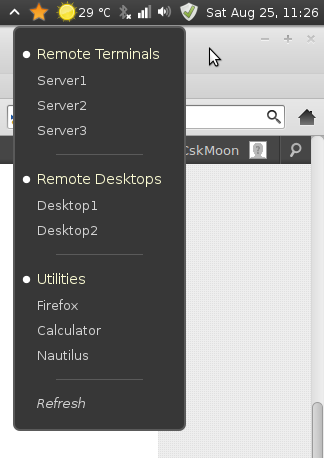
A simple command launcher menu

Log In To Comment!

3 Comments

Krenichny84
Krenichny84-22 hours ago
A great and simple menu for simple, one-line everyday scripts, but there are a few issues: 1. The Star icon is no longer supported. 2. The icon size is sometimes larger than the panel and disrupts the size of other applets. 3. After a system reboot or Cinnamon, the first click in the menu doesn't work; only the second and subsequent clicks work (irritating). To fix the first issue, you need to add any other icon from your theme to line 35 of the applet.js file (I chose "semi-starred-rtl"). To fix the second issue, add the following line to the top of the stylesheet.css file: .applet-icon { icon-size: 1.5em; } I chose icon-size 1.5, but you can set it to something else. But I don't know how to fix the third point. If you have any ideas, please share them... The applet files are located at ~/.local/share/cinnamon/applets/menu@csknet.org Tested on Linux Mint 22.3 (Cinnamon 6.6.7)
SHU-red
SHU-red-5 years ago
Hi there, i love this applet. Very simple and ive got a very often used collection of scripts, always available via this applet. But somehow somtimes (and at the moment basically all the time), the icon is not shown anymore. If i mouseover the are i can use the functions, but the icon is not shown ... By the way .. is there a possibility to customize this icon? Thanks Im Using Linux Mint 20 Cinnamon
SHU-red
SHU-red-5 years ago
Already found the problem: Icon "star" seems not to be present anymore I changed the icon to a custom one i wanted to have ;-) Thanks