

UUID: procmon@ksmith
Last edited:
6 months ago
2026-04-06, 11:03
Last commit: [09efbfb2] procmon@ksmith: Add da.po (#1805)
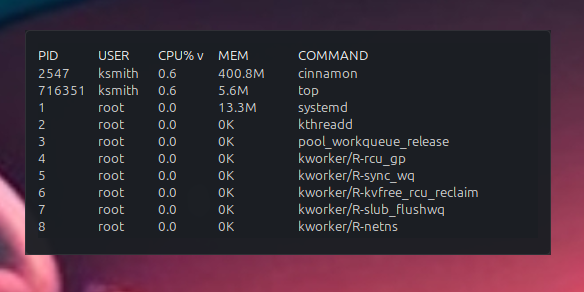
Sortable process table powered by top.
README
ProcMon Table
ProcMon Table is a Cinnamon desklet that shows active processes in a clean, sortable table on your desktop. It is useful when you want a quick live view of which apps are using the most CPU or memory without opening a full system monitor window.
What It Shows
PIDUSERCPU%MEMCOMMAND
By default, rows are sorted by CPU% (highest first).
Features
- Click any column header to sort by that column.
- Click the same header again to reverse sort direction.
- Choose how many rows to display.
- Adjustable column widths.
- Optional "only my processes" filter.
- Two
CPU%scaling modes:per_core(top-style,100%= one full core) andtotal_scaled(100%= full system capacity). - Adjustable refresh interval.
- Custom header/content colors and background transparency.
- Localized strings (
en,es,fr).
Installation
- Open System Settings -> Desklets.
- Find ProcMon Table in the available desklets list.
- Add it to the desktop.
- Open desklet settings to customize layout, colors, and refresh behavior.
Configuration
You can configure:
- Refresh interval
- Row count
- Column widths
- Color and transparency
- "Only my processes" filtering
- CPU scaling mode (
per_coreortotal_scaled)
Notes
- Process data is read from
topin batch mode. - Very long command names are truncated to keep the table readable.
Support and Bug Reports
- Use the Issues button on the Cinnamon Spices desklet page.
- You can also report issues directly at:
https://github.com/linuxmint/cinnamon-spices-desklets/issues- Include your Linux Mint and Cinnamon versions, steps to reproduce, and screenshots if possible.
AI Assistance Note
This desklet was developed with AI assistance. I am the maintainer and will continue maintaining it and responding to bug reports.
Log In To Comment!
0 Comments