

UUID: sys-monitor@Paul163-ai
Last edited:
5 months ago
2026-05-03, 16:24
Last commit: [89a35ada] sys-monitor@Paul163-ai: Add minimalist system monitor desklet (#1834)
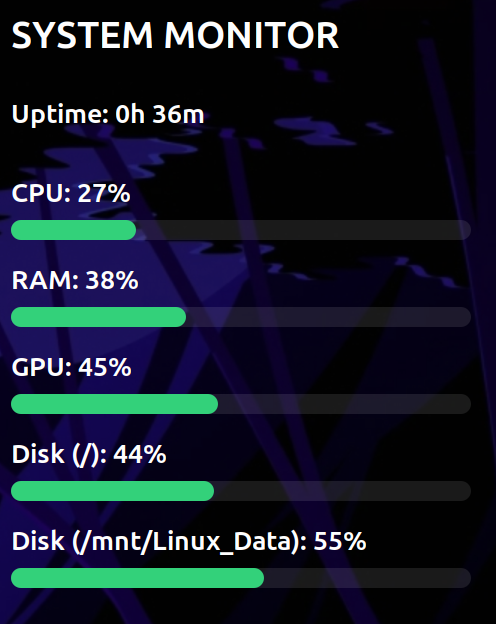
A minimalist monitor for CPU, RAM, GPU, and multiple Disks.
README
Quick System Monitor
A minimalist, high-performance system monitoring desklet for the Cinnamon Desktop. Designed to be clean, non-intrusive, and highly customizable.

Features
- Real-time Monitoring: Tracks CPU, RAM, and GPU usage.
- Multi-Disk Support: Monitor multiple mount points (e.g.,
/,/home, or external drives) simultaneously. - Modern UI: Non-bold typography and a "floating" glass aesthetic.
- High Customizability:
- Scaling: Resize the desklet from 50% to 200% without losing layout integrity.
- Transparency: Achieve true 0% to 100% background opacity.
- Color Control: Custom color pickers for both the background and the progress bars.
Installation
- Copy the folder
sys-monitor@Paul163-aito~/.local/share/cinnamon/desklets/. - Right-click your desktop and select Add Desklets.
- Find Quick System Monitor and click the + button.
Requirements
- NVIDIA GPU Monitoring: Requires
nvidia-smito be installed (standard with NVIDIA proprietary drivers). - Disk Monitoring: Uses GIO for local paths and falls back to
dffor network or specialized mounts.
Configuration Tips
True Transparency
To get the cleanest look, it is highly recommended to:
- Open the desklet Configure menu.
- Go to General Settings (system level).
- Set Desklet Decorations to None.
- Set the Background Transparency slider to your preferred level (0.0 for completely floating text).
Credits
Developed by Paul Lintott. Built for the Linux Mint community.
Log In To Comment!
0 Comments