

UUID: trading-positions@trading-journal
Last edited:
1 month ago
2026-09-07, 11:56
Last commit: [2b841367] Hungarian translation update (#1901)
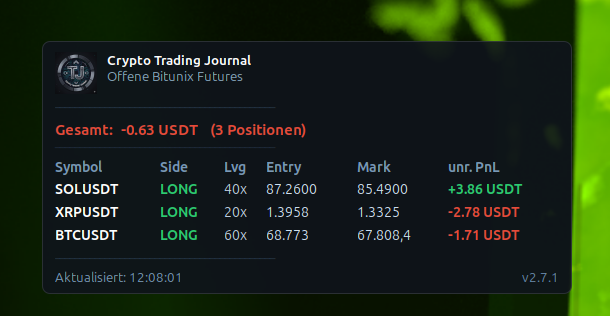
Shows open positions from the Crypto Trading Journal
README
Trading Positions Desklet
Shows your open positions and running bots from a self-hosted Crypto Trading Journal instance directly on your desktop, with live PnL — grouped by exchange.
Features
- Open futures positions from Bitunix and Bitget, plus running Pionex bots
- Grouped per exchange with a per-broker summed PnL
- Per position: symbol, side (LONG/SHORT/NEUTRAL), leverage, entry/mark price, unrealized & realized PnL; bots show entry/liquidation and PnL in the margin coin
- Auto-refreshes on a configurable interval (default 30 s)
- Adjustable font sizes, background opacity and width
Requirements
- A running Crypto Trading Journal instance reachable from this machine (LAN or VPN).
- An ESP32 API key from the journal: open Settings → External displays (ESP32 / Widget / Desklet) and generate a key. The desklet uses the journal's read-only, key-authenticated endpoint, so it keeps working even when the journal's optional password protection is enabled.
Setup
- Add the desklet to your desktop (right-click desktop → Add Desklets).
- Right-click the desklet → Configure and enter:
- Server host / IP (e.g.
192.168.178.100) and port (default8080) - ESP32 API key (from the journal settings above)
- Optional: refresh interval, which columns to show, font sizes, opacity, width
- Server host / IP (e.g.
Links
- Project & documentation: https://github.com/Mouses007/Crypto-Trading-Journal
Log In To Comment!
0 Comments