

README
Cinnamon Rounded Corners
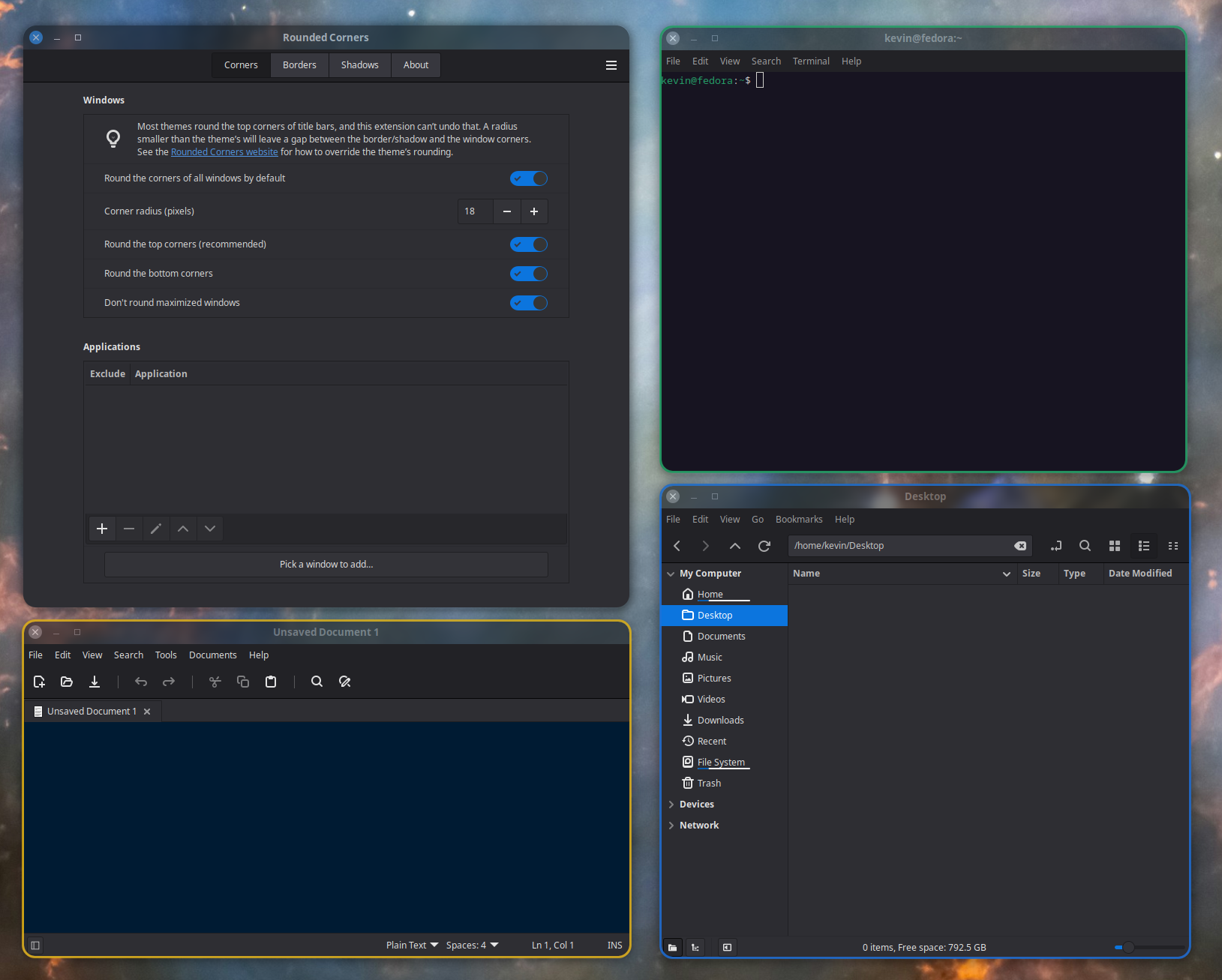
A Cinnamon extension that allows you to round the corners of windows with custom borders and shadows.
Primary use cases:
-
Round window bottoms to match window tops.
-
Increase the radius of your theme's top corner rounding
-
Customize your window border
-
Use different border colors for different application, and/or the focused window
-
Customize your window shadows
- Use different shadow strength the focused window
Features
-
Allows you to Round the top and bottom corners of application windows.
-
Adds custom borders and shadows to windows that have rounding effects applied
-
Allow you to exclude specific applications when rounding is enabled by default
-
Allows you to select specific applications to round when rounding is not enabled by default
-
Allows you to specify different borders setting (i.e colors) for different application windows
-
Allows for different custom borders and shadow strengths for the focused window vs. all the unfocused windows.
-
Has a border matching option allowing the border of the rounded corners to match the windows natural borders
- Supports Gtk3, libhandy, Gtk4, Adwaita and Qt application windows. It should work reasonably well for just about any type of window
Requirements
This extension requires Cinnamon 6.0 or better (i.e Mint 21.3 or better). Using Cinnamon 6.8 (Mint 27) is highly recommended when it's available in late 2026 due to a VRAM leak (see below).
Limitations
Bottom corner cutting:
To achieve a rounded bottom corner a small part of the applications window will be cut off. Normally this is not a problem since applications rarely use that portion of the window. But this can be a problem for some applications, the most obvious one is Gnome Terminal. Characters in the far left or right of the terminals bottom row can be slightly cut off. There are a number of options to mitigate this if you find it unacceptable:
-
Use a smaller corner radius
-
Exclude Gnome Terminal from having its corners rounded
- Use some other terminal program that leaves a small space between the window bottom and the last line in the terminal (i.e Ghostty)
Reducing Top corner rounding:
The Rounded Corners extension can not square off corners that are already rounded by the system Applications Theme.
But you can override the theme's rounding using 2 CSS files.
The CSS code below will remove the title bar rounding completely so that you can use the Rounded Corners extension to define whatever rounding you like, even a rounding radius that is less than the themes default radius. It also removes borders.
~/.config/gtk-3.0/gtk.css
/* 1. Square off the title-bars for Gtk3 applications */
headerbar, .titlebar {
    border-radius: 0px;
    border-top-left-radius: 0px;
    border-top-right-radius: 0px;
    border: none;
    box-shadow: none;
}

/* 2. Window decorations only - skip popups (combobox/menu dropdowns) and tooltips,
      whose 1px border is drawn by the decoration's box-shadow */
window.csd:not(.popup):not(tooltip),
window.csd:not(.popup):not(tooltip) > decoration,
window.solid-csd > decoration,
window.ssd > decoration,
window.ssd > decoration:backdrop {
    border-radius: 0px;
    border-top-left-radius: 0px;
    border-top-right-radius: 0px;
    box-shadow: none;
}
~/.config/gtk-4.0/gtk.css
window {
    --window-radius: 0px;
    border-radius: 0px;
}
Some windows use their own custom title-bars. For those applications you will need to use a rounding radius that matches (or exceeds) the windows natural radius to avoid some unpleasant visual issues around the corners.
Shadows:
The stock shadows are by necessity removed by the corner effect. So this extension tells Cinnamon not to draw the stock shadows at all for windows that have cornet effects applied. The shadows need to be recreated for the clipped corners anyhow. A new shadow is therefore created in its place. By using a completely new shadow effect it gives you more control over how shadows appear. Keep in mind that the new shadow effect is only possible for windows that also have their corners rounded, see the "Corners" tab in the settings.
Borders:
It can be difficult to reconstruct matching borders around the clipped bottom corners. The default "Match the window's own border" option will attempt to detect the windows natural borders and recreate it for the rounded corner, and it does a surprisingly good job at that if I do say so myself. But I am sure there will be cases where the results are not perfect. I would suggest you apply custom borders for cases where the "Match" option is not working out well. Use the "Application borders" table under the "Borders" tab in the settings to define application specific border settings. Keep in mind that this extension will only apply borders to windows that also have corner rounding enabled under the "Corner" tab in the settings.
VRAM Leak:
There is a bug in the Clutter.ShaderEffect class causing a VRAM memory leak. A fix was submitted to Muffin to address the issue. The work-around is to use the Cinnamon.GLSLEffect class instead, but it has visual side-effects that I can't fix until a new API is available which lands in Cinnamon 6.8. For now I use caching to limit the leak to your maximum number of concurrent open windows. As soon as you update to Cinnamon 6.8 (Mint 27) the extension will automatically switch to GLSLEffect and eliminate the leak!
Installation
- Right click on the cinnamon panel and click "System Settings"
- Click on the "Extensions" icon under the "Preferences" category
- Click the "Download" tab and then click the "Rounded Corners" entry
- Click the "Install" button on the right and then return to the "Manage" tab
- Select the new "Rounded Corners" entry and then click the "+" button at the bottom of the window
- Use the "gears" icon next to the "Rounded Corners" entry to open the setting window and setup the preferred behavior
Feedback
Please leave a comment here on cinnamon-spices.linuxmint.com or you can create an issue on my Github to give me feedback, make a suggestion or to report any issues you find.
If you like this Cinnamon extension, please give it a "star" here any maybe on my Github repository as well to encourage me to continue working on the project. Thanks!
Credits
The rounded corner effect code was borrowed from the Gnome Blur my shell extension by Aurélien Hamy.
The Rounded Corners icon was generated by Claude AI. Claude was also used to speed up development of this extension and help with debugging some issues. Claude wrote 100% of the shadow effect code.
Log In To Comment!
5 Comments