

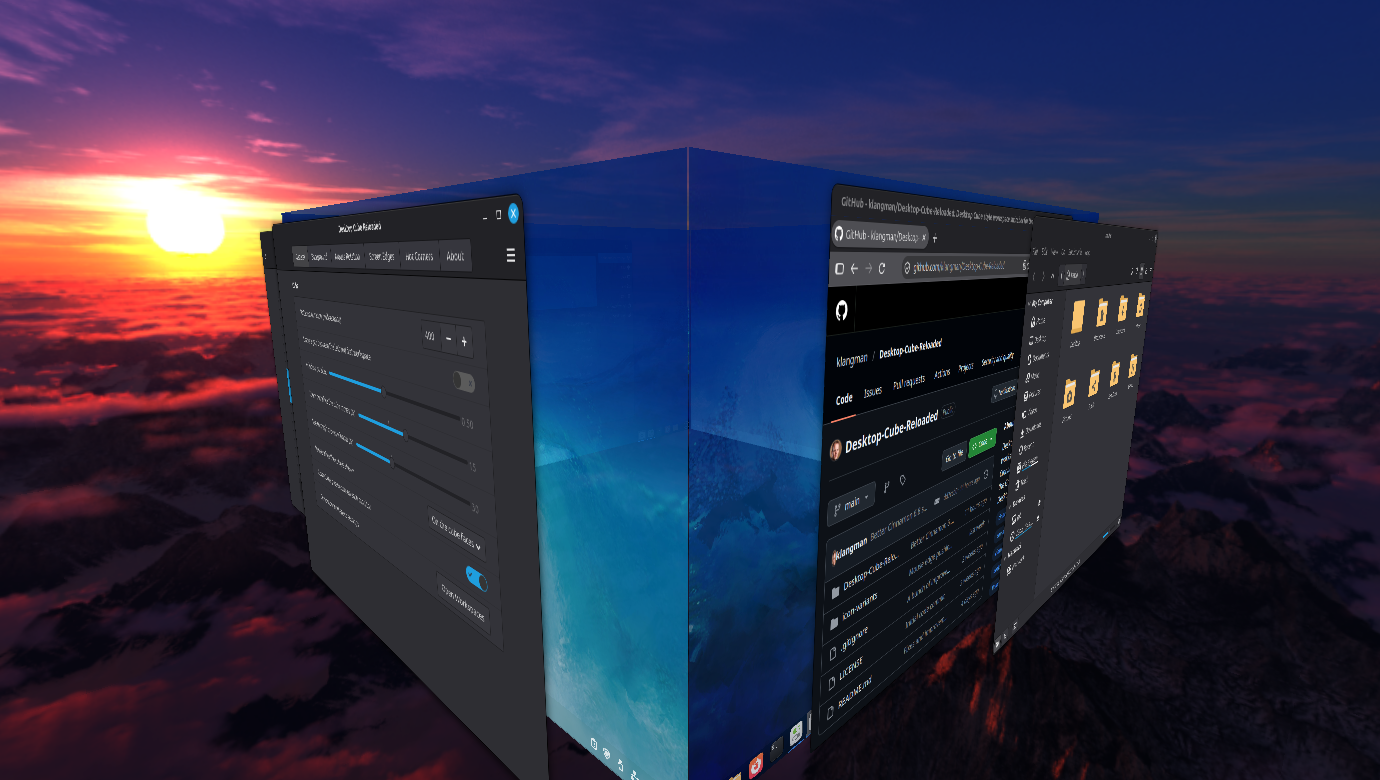
README
Desktop Cube Reloaded
A Cinnamon extension that rotates your workspaces as the faces of a 3D cube.
This is a port of Simon Schneegans' Desktop Cube extension for GNOME Shell.
This Cinnamon port is called "Reloaded" because Cinnamon already has a simpler Desktop Cube extension.
Features
- A Desktop-Cube style animation for workspace switching similar to the Compiz effect.
- Mouse Rotation: freely rotate the Cube initiated by left clicking on a free space on the panel, using the Alt+Super+Space hotkey. In addition you can enable a Hot Corner option or enable mouse-pushing option to enter mouse rotation mode. Using the mouse scroll-wheel zooms in/out the cube.
- Panels can be hidden, shown on top of the cube or shown on the face of the cubes.
- Supports multi-monitors setups, showing a cube on each monitor in the correct perspective.
- Skybox: Shows a 360 degree panorama type backdrop using HDRI type images which you can find on the internet.
- Allow you to drag windows to the screen edge to move windows to adjacent cube faces (workspaces)
- Mouse pushing and window drag pushing shows a cube preview hint so you know when a cube flip is about to happen. This gives you the opportunity to cancel the change by backing off the mouse pressure.
- Works with Blur Cinnamon so blurred elements look correct on the Cube faces
- Supports Wayland in Cinnamon 6.8 (Mint 27).
Requirements
This extension requires Cinnamon 6.0 or better (i.e. Mint 21.3 or better) and supports Cinnamon 6.8 (Mint 27). Wayland support is only for Cinnamon 6.8 or better.
If you have installed any of the following Cinnamon extensions, you should disable them before enabling Desktop Cube Reloaded:
- Desktop-Cube
- Flipper
Desktop-Cube-Reloaded will refuse to operate when one of these extensions are already loaded, but attempting to load these extension after loading Desktop-Cube-Reloaded will just break things.
Limitations
- Panels on the cube faces are live copies of the real panels, so every face shows the same panel: a window list that only shows the current workspace, or the workspace switcher, shows the current workspace's state on every face. With Blur Cinnamon, a panel's blur is missing on the other faces while a full-screen window hides that panel on the current one.
- The cube in Expo is not planned for now.
Installation
- Right click on the Cinnamon panel and click "System Settings"
- Click on the "Extensions" icon under the "Preferences" category
- Click the "Download" tab and then click the "Desktop Cube Reloaded" entry
- Click the "Install" button on the right and then return to the "Manage" tab
- Select the new "Desktop Cube Reloaded" entry and then click the "+" button at the bottom of the window
- Use the "gears" icon next to the "Desktop Cube Reloaded" entry to open the setting window and setup the preferred behavior
Feedback
Please leave a comment here on cinnamon-spices.linuxmint.com or you can create an issue on my Github to give me feedback, make a suggestion or to report any issues you find.
If you like this Cinnamon extension, please give it a "star" here and maybe on my Github repository as well to encourage me to continue working on the project. Thanks!
Credits
The majority of code is a copy from Simon Schneegans' Desktop Cube (the Gnome version), my own Blur Cinnamon or written by Claude AI based on my prompting. I have done code reviews of all the AI generated code.
The extension icon is a slightly modified version of Simon Schneegans' Desktop Cube icon, licensed under CC BY 4.0.
License
GPL-3.0-or-later, like the original Gnome extension this was ported from.
Log In To Comment!
1 Comments